
| Day | Date | Time | Title |
|---|---|---|---|
| 1 | 2026-03-20 | 09:30 - 10:00 | Welcome & Introduction |
| 1 | 2026-03-20 | 10:00 - 10:30 | Quarto: Introduction |
| 1 | 2026-03-20 | 10:30 - 10:45 | Quarto: Presentations |
| 1 | 2026-03-20 | 10:45 - 11:00 | Git: Setup & Configuration |
| 1 | 2026-03-20 | 11:00 - 11:15 | Command Line |
| 1 | 2026-03-20 | 11:15 - 12:00 | Git: Basics |
| 1 | 2026-03-20 | 12:00 - 13:00 | Lunch Break |
| 1 | 2026-03-20 | 13:00 - 14:00 | Git: Remotes |
| 1 | 2026-03-20 | 14:00 - 15:00 | Git: Collaboration |
| 1 | 2026-03-20 | 15:00 - 15:30 | Quarto: Publication to GitHub Pages |
| 1 | 2026-03-20 | 15:30 - 16:00 | Git: Tags & Releases |
Git: Collaboration
FAIR & Reproducible Teaching with Quarto & Git
Course at University of Hamburg
Slides | Source

14:00
Schedule
Day 1
1 Last session
Last session: Learning objectives
After the last session, you should now be able to answer the following questions / do the following:
💡 You can create a remote repository.
💡 You can connect your local Git repository to a remote repository service like GitHub or GitLab.
💡 You can pull and push changes to and from a remote repository.
💡 You can clone a repository from a remote repository.
2 This session: Git: Collaboration
Objectives
💡 You know the purpose and components of a Pull Request.
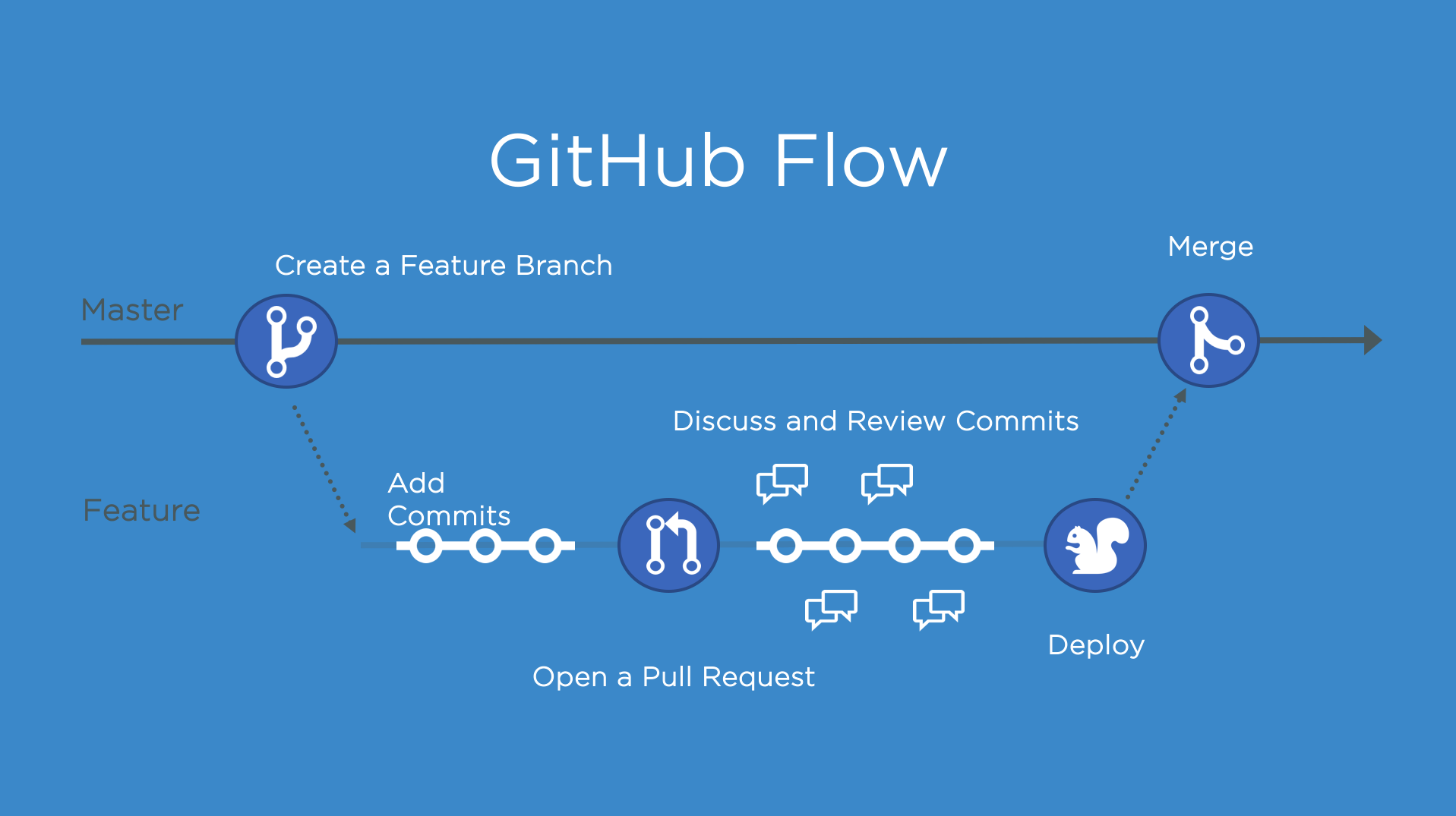
💡 You know how to collaborate using the popular workflow strategy GitHub flow.
💡 You know the purpose and components of a README file.
💡 You can fork a repository.
💡 You can create a Pull Request from a forked repository.
💡 You can protect your main branch.
Reading
Tasks
In this session, you will work on the following tasks:
- Reading: Read the chapter(s) GitHub - Advanced in the Version Control Book.
- Implementation: Try out the commands in the chapter.
- Exercises: Work on the exercises.
As always:
- Try out the commands of this session and play around with them.
- Check whether you have achieved the learning objectives.
- Ask questions!
GitHub Flow
Exercises
“Public” collaboration with pull requests (using a fork and GitHub Flow)
- Find out what forking is.
- Fork the project repository of the course instructor or another course participant (ideally, someone who is not your collaborator from the previous exercise).
- Create an Issue in your new collaborator’s repository, indicating an entry that you think is still missing in their repository.
- Repeat the steps from the exercise on collaboration with remote repositories using the forked repository:
- Clone the forked repository to a sensible location on your computer.
- Create a new branch and make one or multiple commits “fixing” the Issue that you opened. If available, follow the contributing guide of your collaborator’s repository.
- Push your changes to the remote repository.
- Create a pull/merge request with your changes (hint: from the forked to the original repository) and refer to the Issue in your pull/merge request.
Reviewing pull requests
- View any pull requests that are created in your
recipesrepository. - Review the changes made by the contributor in the pull request.
- If needed, discuss additional changes with the contributor in the pull request.
- Close the pull request by merging the proposed changes.
3 Solutions
Solutions: “Public” collaboration with pull requests
Code
#!/bin/bash

1git clone https://github.com/your-username/forked-repo-name.git /path/to/your/forked/directory
cd /path/to/your/forked/directory
2git checkout -b issue-fix-branch
echo "New entry" >> project.txt
git add project.txt
git commit -m "Add new entry to fix #1"
3git push origin issue-fix-branch
4# Create a pull request on GitHub- 1
- Forking is a process where you create a copy of someone else’s repository under your own account. It allows you to freely experiment with changes without affecting the original project.
- 2
-
To fork the project repository of another course participant: (1) Go to the GitHub repository you want to fork. (2) Click the
Forkbutton at the top-right corner of the repository page. (3) Select your GitHub account to fork the repository. - 3
-
Create an Issue, suggesting a missing entry: (1) Go to the Issues tab of your partner’s repository on GitHub. (2) Click
New issue. Provide a title and description for the Issue, suggesting a missing entry. (3) ClickSubmit new issue. - 4
- Clone the forked repository, create a branch, commit changes, push, and open a pull request:
FAIR & Reproducible Teaching