
| Command | Description |
|---|---|
git branch |
Lists / creates and deletes branches |
git branch feature |
Creates the feature branch |
git branch -d feature |
Deletes the feature branch |
git switch |
Switches between branches |
git switch feature |
Switches to the feature branch |
git checkout |
Switches between branches |
git checkout -b feature |
Creates and switches to the feature branch |
git merge |
Merges branches |
git merge feature |
Merges the feature branch into the current branch |
git merge --abort |
Aborts a merge |
git merge --squash |
Squaches commits on branch into a single commit and merge |
Session 5: Branches
Track, organize and share your work: An introduction to Git for research
Course at Max Planck Institute for Human Development
Slides | Source


12:00
1 This session: Branches
This session: Branches
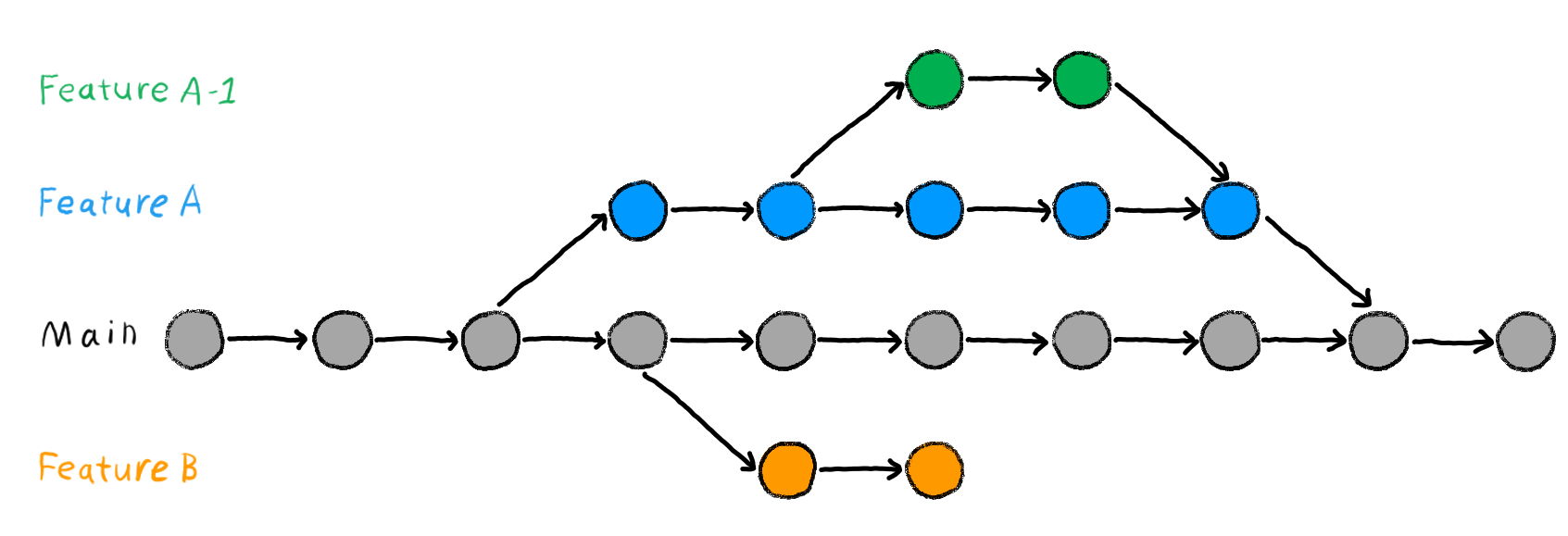
Learning objectives
💡 You understand the purpose and benefits of using branches in Git.
💡 You can create and switch between branches.
💡 You can merge branches and resolve merge conflicts.
💡 You can name at least three best practices when working with branches.
Reading
Tasks
In this session, you will work on the following tasks:
- Reading: Read the chapter(s) “Branches” in the Version Control Book.
- Implementation: Try out the commands in the chapter.
- Exercises: Work on the exercises for the
recipesproject.
As always:
- Try out the commands of this session and play around with them.
- Check whether you have achieved the learning objectives.
- Ask questions!
- Let’s git started!
recipes project
At the end of this session, you should have accomplished the following:
- You created a new branch and merged changes into your default branch (
mainormaster). - You created and resolved a merge conflict.
Please keep the recipes folder! We will continue to use it in the following sessions.
Cheatsheet
Exercises
Branches
- If needed, navigate to the project repository using the command line.
- Create a new branch with a descriptive name, e.g.,
add-pizza-recipe. - Switch to the new branch.
- Add a new recipe to
recipes.txt. - Stage and commit the changes to
recipes.txton the new branch. - View the contents of
recipes.txtto verify your changes. - Switch back to the default branch (
mainormaster). - View the contents of
recipes.txtagain to confirm that the changes do not exist on the default branch. - Merge the new branch into your default branch.
- Delete the feature branch.
- View the contents of
recipes.txtyet again to confirm that the changes have been merged into the default branch.
🚀 Bonus exercises
Create and resolve a merge conflict
- Deliberately create a merge conflict by making conflicting changes to the same section of
recipes.txton two separate branches (for example, change the same ingredient differently on each branch) and attempting to merge them. An example can be found in the branches chapter. - Resolve the merge conflict.
- Delete the merged branch afterwards.
Solutions: Branches
cd recipes
git branch feature
git switch feature
cat >> recipes.txt <<- EOM

Potatoes

1. Wash the potatoes and cut them into evenly sized chunks.
2. Bring water to the boil in a large saucepan.
3. Once the water is boiling, add a good pinch of salt.
3. Add the potatoes.
4. Cook the potatoes for 15 - 20 minutes or until fork-tender.
5. Drain the pasta in a colander.
EOM
git add recipes.txt
git commit -m "Add potatoes recipe to recipes.txt"
cat recipes.txt
git checkout main
cat recipes.txt
git merge feature
git branch -d feature
cat recipes.txt- Optional: Navigate into the project repository using
cd(or a similar path). - Create a new branch called
add-pizza-recipeusinggit branch add-pizza-recipe. - Switch to the new branch using
git switch add-pizza-recipe. You can also create and switch the branch in one step usinggit checkout -b add-pizza-recipe. - Add a new recipe to
recipes.txt. You can use your regular text editor. Here, we add a new entry from the command line usingcat. - Stage and commit the changes to
recipes.txtusinggit addandgit commit. - View the contents of
recipes.txtto verify your changes. Here, we use thecatcommand again. - Switch back to the default branch (
mainin this example). Here, we usegit checkout mainbut you can also usegit switch main. - View the contents of
recipes.txtagain to confirm that the previous changes do not exist on themainbranch. - Merge the
add-pizza-recipebranch into themainbranch. - Delete the merged
add-pizza-recipebranch usinggit branch -d add-pizza-recipe. - View the contents of
recipes.txtyet again to confirm that the previous changes have been merged into themainbranch.
Solutions: Merge Conflict
cd recipes
git branch feature
git switch feature
cat >> recipes.txt <<- EOM

Chocolate Cake

1. Preheat the oven to 350°F (175°C).
2. Mix flour, sugar, cocoa powder, baking powder, and salt in a bowl.
3. Add eggs, milk, oil, and vanilla extract, and mix well.
4. Pour the batter into a greased baking pan.
5. Bake for 30-35 minutes.

EOM
git add recipes.txt
git commit -m "Add chocolate cake recipe to recipes.txt"
git checkout main
cat >> recipes.txt <<- EOM

Vanilla Cake

1. Preheat the oven to 350°F (175°C).
2. Mix flour, sugar, baking powder, and salt in a bowl.
3. Add eggs, milk, oil, and vanilla extract, and mix well.
4. Pour the batter into a greased baking pan.
5. Bake for 25-30 minutes.

EOM

git add recipes.txt
git commit -m "Add vanilla cake recipe to recipes.txt"
git merge feature
sed -i '' -e '/^<<<<<<< /d' -e '/^=======/d' -e '/^>>>>>>> /d' recipes.txt
git add recipes.txt
git commit -m "Resolve merge conflict by adding both chocolate and vanilla cake recipes"
git branch -d feature- Navigate into the
recipesrepository usingcd(or a similar path). - Create a new branch called
featureusinggit branch feature. - Switch to the new branch using
git switch feature. You can also create and switch the branch in one step usinggit checkout -b feature. - Add a new recipe to your
recipes.txtfile usingcat. - Stage and commit the changes to
recipes.txtusinggit addandgit commit. - Switch back to the default branch (
mainin this example) usinggit checkout main. You can also usegit switch main. - Make conflicting changes in the
mainbranch torecipes.txtusingcat. - Stage and commit the conflicting changes to
recipes.txtusinggit addandgit commit. - Attempt to merge the
featurebranch with the default branch to create a merge conflict usinggit merge feature. - Resolve the merge conflict by editing
recipes.txt. You can use a regular text editor to do this. In this example, we remove the conflict markers that Git added torecipes.txtusingsedwhich results in keeping both recipes. This is not a recommended way to resolve merge conflicts and we only do it here to resolve the merge conflict without manual intervention. Merge conflicts usually always require manual resolution by the user. - Stage the resolved changes to
recipes.txtusinggit add. - Commit the resolved changes in
recipes.txtwith a descriptive commit message usinggit commit. - Delete the merged
featurebranch usinggit branch -d feature.
Version Control Course