Version Control of Data with DataLad
Tutorial: Research Data Management with DataLad

Acknowledgements
This tutorial was initially created by Adina Wagner for the 2020 OHBM Brainhack Traintrack session on DataLad. You can find the original notebook here. This notebook accompanies this tutorial video by Adina Wagner.
Setup
Installation
Depending on your environment, paste the installation command here:
Configuring your Git identity
The first step, if you haven’t done so already, is to configure your Git identity. If you’re new to Git, don’t worry! This configuration simply involves setting your name and email address, which will associate your changes in a project with you as the author.
For this tutorial, we configure an example name and email address:
Introduction
DataLad is a data management tool that assists you in handling the entire lifecycle of digital objects. It is a command-line tool, free and open source, and available for all major operating systems. In the command line, all operations begin with the general datalad command.
The basic datalad command without any arguments will show you a brief overview of available subcommands. This is useful for getting a quick reference of what DataLad can do.
For example, you can type datalad --help to find out more about the available commands. This will show you detailed information about command-line options and a complete list of all available DataLad commands. You can also get help for specific commands by running datalad <command> --help, for example datalad create --help.
DataLad Python API
DataLad also has a Python API that can be used in Python scripts and Jupyter notebooks. This is particularly useful for programmatic data management and integration into data analysis workflows.
Code Output
DataLad Python API is availableIn Python scripts, you can import the DataLad API as follows:
You can find more details about how to install DataLad and its dependencies on all operating systems in the DataLad Handbook. This section also explains how to install DataLad on shared machines where you may not have administrative privileges (sudo rights), such as high-performance computing clusters. If you already have DataLad installed, make sure that it is a recent version. DataLad is actively developed, and newer versions often include bug fixes, performance improvements, and new features. You can check the installed version using the datalad --version command:
This command shows not only the DataLad version but also information about the underlying Git and git-annex versions that DataLad depends on. If your version is significantly older than the latest release, consider updating to take advantage of recent improvements.
Creating a DataLad dataset
Every command in DataLad affects or uses DataLad datasets, the core data structure of DataLad. A dataset is a directory on a computer that DataLad manages. You can create new, empty datasets from scratch and populate them, or transform existing directories into datasets.
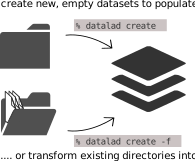
Let’s start by creating a new DataLad dataset. Creating a new dataset is accomplished using the datalad create command. This command requires only a name for the dataset. It will then create a new directory with that name and instruct DataLad to manage it.
Additionally, the command includes an option, -c text2git. The -c option allows for specific configurations (also called “procedures”) of the dataset at the time of creation. The text2git configuration is particularly useful because it tells DataLad to store text files (like code, scripts, documentation) directly in Git instead of using git-annex. This means that text files will be version-controlled in the traditional Git way, making them easier to view, edit, and track changes. Binary files (like images, data files) will still be managed by git-annex for efficient storage. You can find detailed information about the text2git configuration in the DataLad handbook, specifically in the sections on configurations and procedures.
Code Output
[INFO   ] Running procedure cfg_text2git

[INFO   ] == Command start (output follows) =====


Total: 0.00 datasets [00:00, ? datasets/s]


Total:   0%|                                     | 0.00/115 [00:00<?, ? Bytes/s]


Total:   0%|                                 | 0.00/1.00 [00:00<?, ? datasets/s]
Total:   0%|                                 | 0.00/1.00 [00:00<?, ? datasets/s]

[INFO   ] == Command exit (modification check follows) =====

run(ok): /app/DataLad-101 (dataset) [/app/.venv/bin/python /app/.venv/lib/pyt...]

create(ok): /app/DataLad-101 (dataset)

action summary:

  create (ok: 1)

  run (ok: 1)
This command creates a new directory called DataLad-101 and initializes it as a DataLad dataset. The dataset will be empty initially, but it’s now ready to track and manage your files and their history.
Right after dataset creation, there is a new directory on the computer called DataLad-101. Let’s navigate into this directory using the cd command and list the directory contents using ls.
The cd command stands for “change directory” and is used to navigate between folders in your filesystem. Here we’re moving into our newly created DataLad dataset.
The ls command lists the contents of the current directory. Since our dataset was just created, it appears empty to the ls command. However, DataLad has actually created some hidden files (files starting with .) that contain the dataset’s metadata and version control information. You could see these hidden files by running ls -la, which shows all files including hidden ones.
Datasets have the exciting feature of recording everything done within them. They provide version control for all content managed by DataLad, regardless of its size. Additionally, datasets maintain a complete history that you can interact with. This history is already present, although it is quite short at this point in time. Let’s take a look at it nonetheless. This history exists thanks to Git, which is the version control system that DataLad builds upon. You can access the history of a dataset using any tool that displays Git history. For simplicity, we will use Git’s built-in git log command.
Code Output
commit 83121b3edd19c3ffeff67d41aca896923f053dd2 (HEAD -> master)
Author: Ford Escort <42@H2G2.com>
Date:   Fri May 8 07:19:15 2026 +0000

    Instruct annex to add text files to Git

commit 9ebb5e42d86355ab15201066eaca470cbf3f2fae
Author: Ford Escort <42@H2G2.com>
Date:   Fri May 8 07:19:14 2026 +0000

    [DATALAD] new dataset
The git log command shows the commit history of the repository. Each commit represents a snapshot of your dataset at a particular point in time. You’ll see information like the commit hash (a unique identifier), the author, the date, and the commit message. Even though we haven’t added any files yet, DataLad has already made an initial commit when creating the dataset.
Version control workflows
Building on top of Git and git-annex, DataLad allows you to version control arbitrarily large files in datasets. You can keep track of revisions of data of any size, and view, interact with, or restore any version of your dataset’s history.
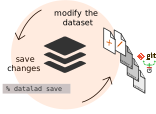
Let’s start by creating a books directory using the mkdir command. Next, we will download two books from the internet. Here, we are using the command line tool curl to accomplish this, allowing us to perform all actions from the command line. However, if you prefer, you can also download the books manually and save them into the dataset using a file manager. Remember, a dataset is simply a directory on your computer.
The mkdir command stands for “make directory” and creates a new folder. Here we’re creating a subfolder called books inside our DataLad dataset to organize our content. Good organization is key to maintaining clean and understandable datasets.
Now we navigate into the books directory we just created.
Code Output
  % Total    % Received % Xferd  Average Speed   Time    Time     Time  Current
                                 Dload  Upload   Total   Spent    Left  Speed
  0     0    0     0    0     0      0      0 --:--:-- --:--:-- --:--:--     0100   629  100   629    0     0   4973      0 --:--:-- --:--:-- --:--:--  4992
100   421  100   421    0     0   1625      0 --:--:-- --:--:-- --:--:--  1625
100 2070k  100 2070k    0     0  3409k      0 --:--:-- --:--:-- --:--:-- 3409k
  % Total    % Received % Xferd  Average Speed   Time    Time     Time  Current
                                 Dload  Upload   Total   Spent    Left  Speed
  0     0    0     0    0     0      0      0 --:--:-- --:--:-- --:--:--     0  0     0    0     0    0     0      0      0 --:--:--  0:00:01 --:--:--     0100 47400  100 47400    0     0  28430      0  0:00:01  0:00:01 --:--:-- 28434
The curl command is a powerful tool for downloading files from the internet. Here’s what each option means:
-Ltells curl to follow redirects (many URLs redirect to the actual file location)-o filename.pdfspecifies the output filename for the downloaded file- The URL is the web address where the file is located
We’re downloading two educational books: “The Linux Command Line” (TLCL) and “A Byte of Python”. These downloads will demonstrate how DataLad tracks and manages binary files.
Let’s navigate back to the dataset root (DataLad-101 folder) and run the tree command which can visualize the directory hierarchy:
The cd ../ command moves up one directory level, taking us back to the root of our DataLad dataset. The ../ notation means “parent directory”.
The tree command provides a visual representation of your directory structure in a tree-like format. This is especially useful for understanding the organization of your dataset and seeing all files and folders at a glance. If tree is not available on your system, you can install it or use alternatives like find . -type d to list directories.
Use the datalad status command to find out what has happened in the dataset. This command is very helpful as it reports on the current state of your dataset. Any new or changed content will be highlighted. If nothing has changed, the datalad status command will report what is known as a clean dataset state. In general, it is very useful to maintain a clean dataset state. If you know Git, you can think of datalad status as the git status of DataLad.
The datalad status command will show you:
- Untracked files: New files that DataLad hasn’t been told to manage yet
- Modified files: Files that have changed since the last save
- Clean state: No changes detected
Run datalad status frequently to understand what changes have occurred in your dataset. This is one of the most important diagnostic commands in DataLad.
Any content that we want DataLad to manage needs to be explicitly added to DataLad. It is not enough to simply place it inside the dataset. To give new or changed content to DataLad, we need to save it using datalad save. This is the first time we need to specify a “commit message”, which is done using the -m option of the command. A “commit” is a snapshot of your project’s files at a specific point in time. The commit message is a short text description that explains the changes made when saving the current changes in a DataLad dataset.
Code Output
Total: 0.00 datasets [00:00, ? datasets/s]


Total:   0%|                                   | 0.00/2.17M [00:00<?, ? Bytes/s]


Total:   0%|                                 | 0.00/1.00 [00:00<?, ? datasets/s]
Total:   0%|                                 | 0.00/1.00 [00:00<?, ? datasets/s]

add(ok): books/TLCL.pdf (file)


Total:   0%|                                 | 0.00/1.00 [00:00<?, ? datasets/s]

add(ok): books/byte-of-python.pdf (file)


Total:   0%|                                 | 0.00/1.00 [00:00<?, ? datasets/s]

save(ok): . (dataset)


Total: 100%|██████████████████████████| 1.00/1.00 [00:00<00:00, 15.0 datasets/s]

action summary:

  add (ok: 2)

  save (ok: 1)
The datalad save command is similar to git add and git commit combined. When you run this command:
- DataLad stages all untracked and modified files
- Creates a commit with the provided message
- For large files, stores them efficiently using git-annex
Good commit messages should be:
- Descriptive: Explain what was added or changed
- Concise: Keep them short but informative
- Imperative mood: Use commands like “Add”, “Fix”, “Update”
Without a path specified, datalad save will save all changes in the dataset.
With git log -n 1 you can take a look at the most recent commit in the history:
Code Output
commit 6e411eadea8372f5796ab8041c1a28e7d1619a37 (HEAD -> master)
Author: Ford Escort <42@H2G2.com>
Date:   Fri May 8 07:19:19 2026 +0000

    Add books on Python and Unix to read later
The -n 1 option limits the output to just the most recent commit. This is useful when you want to quickly see what was last saved without scrolling through the entire history. You can change the number to see more commits, for example -n 5 would show the last 5 commits.
datalad save saves all untracked content to the dataset. Sometimes, this can be inconvenient. One significant advantage of a dataset’s history is that it allows you to revert changes you are not happy with. However, this is only easily possible at the level of single commits. If one save commits several unrelated files or changes, it can be difficult to disentangle them if you ever want to revert some of those changes. To address this, you can provide a path to the specific file you want to save, allowing you to specify more precisely what will be saved together.
This granular approach to version control is one of the best practices in data management:
- Logical grouping: Save related changes together
- Atomic commits: Each commit should represent one logical change
- Easier reverting: You can undo specific changes without affecting others
Let’s demonstrate this by adding another book from the internet:
Code Output
  % Total    % Received % Xferd  Average Speed   Time    Time     Time  Current
                                 Dload  Upload   Total   Spent    Left  Speed
  0     0    0     0    0     0      0      0 --:--:-- --:--:-- --:--:--     0  0     0    0     0    0     0      0      0 --:--:-- --:--:-- --:--:--     0
100 11.8M 100 11.8M 0 0 19.6M 0 --:--:-- --:--:-- --:--:-- 19.6MNow when you run datalad save, attach a path to the command:
Code Output
Total: 0.00 datasets [00:00, ? datasets/s]


Total:   0%|                                   | 0.00/12.5M [00:00<?, ? Bytes/s]


Total:   0%|                                 | 0.00/1.00 [00:00<?, ? datasets/s]
Total:   0%|                                 | 0.00/1.00 [00:00<?, ? datasets/s]

add(ok): books/progit.pdf (file)


Total:   0%|                                 | 0.00/1.00 [00:00<?, ? datasets/s]

save(ok): . (dataset)


Total: 100%|██████████████████████████| 1.00/1.00 [00:00<00:00, 15.2 datasets/s]

action summary:

  add (ok: 1)

  save (ok: 1)
By specifying the file path books/progit.pdf, we’re telling DataLad to only save this specific file. This creates a focused commit that only includes the Git book, making the history cleaner and more meaningful. You can specify multiple files, directories, or use wildcards if needed. For example:
datalad save -m "message" file1.txt file2.txt(save specific files)datalad save -m "message" code/(save entire directory)datalad save -m "message" *.py(save all Python files)
Let’s take a look at files that are frequently modified, such as code or text. To demonstrate this, we will create a file and modify it. We will use a here doc for this, but you can also write the note using an editor of your choice. If you execute this code snippet, make sure to copy and paste everything, starting with cat and ending with the second EOT.
This command uses a “here document” (heredoc) to create a text file:
cat << EOTstarts a heredoc with “EOT” as the delimiter- Everything between the two
EOTmarkers becomes the file content > notes.txtredirects this content to a new file callednotes.txt- The final
EOTon its own line ends the heredoc
This is a convenient way to create multi-line text files from the command line.
datalad status will, as expected, say that there is a new untracked file in the dataset:
We can save the newly created notes.txt file with the datalad save command and a helpful commit message. As this is the only change in the dataset, there is no need to provide a path:
Code Output
Total: 0.00 datasets [00:00, ? datasets/s]


Total:   0%|                                    | 0.00/92.0 [00:00<?, ? Bytes/s]


Total:   0%|                                 | 0.00/1.00 [00:00<?, ? datasets/s]
Total:   0%|                                 | 0.00/1.00 [00:00<?, ? datasets/s]

add(ok): notes.txt (file)


Total:   0%|                                 | 0.00/1.00 [00:00<?, ? datasets/s]

save(ok): . (dataset)


Total: 100%|██████████████████████████| 1.00/1.00 [00:00<00:00, 29.9 datasets/s]

action summary:

  add (ok: 1)

  save (ok: 1)
Let’s now add another note to modify this file:
Notice the use of >> instead of > in this command:
>redirects output and overwrites the file (creates new file or replaces existing content)>>redirects output and appends to the file (adds content to the end of existing file)
This demonstrates how you can modify existing files, which is common when working with documentation, code, or data analysis notes.
A datalad status command reports the file as not untracked. However, because it differs from the state it was saved under, it is reported as modified.
DataLad can detect when files have been modified since the last save. The status will now show notes.txt as “modified” rather than “untracked”. This means:
- Untracked: File is new and hasn’t been added to version control
- Modified: File was previously saved but has changes since the last save
- Clean: No changes detected since last save
Tracking these states helps you understand what changes need to be saved.
Let’s save this:
Code Output
Total: 0.00 datasets [00:00, ? datasets/s]


Total:   0%|                                     | 0.00/239 [00:00<?, ? Bytes/s]


Total:   0%|                                 | 0.00/1.00 [00:00<?, ? datasets/s]
Total:   0%|                                 | 0.00/1.00 [00:00<?, ? datasets/s]

add(ok): notes.txt (file)


Total:   0%|                                 | 0.00/1.00 [00:00<?, ? datasets/s]

save(ok): . (dataset)


Total: 100%|██████████████████████████| 1.00/1.00 [00:00<00:00, 30.4 datasets/s]

action summary:

  add (ok: 1)

  save (ok: 1)
If you take a look at the history of this file with git log, the history neatly summarizes all of the changes that have been done:
Code Output
commit 387918a401cb953c5cd5fc16c232433182297ea4 (HEAD -> master)
Author: Ford Escort <42@H2G2.com>
Date:   Fri May 8 07:19:23 2026 +0000

    Add notes on datalad save

commit 2da4412304a8a374aba386e7e7fdee0858b8ea60
Author: Ford Escort <42@H2G2.com>
Date:   Fri May 8 07:19:22 2026 +0000

    Add notes on datalad create
The git log -n 2 command shows the last 2 commits in the repository history. This allows you to see how your dataset has evolved over time. Each commit includes:
- Commit hash: A unique identifier for the commit
- Author and date: Who made the change and when
- Commit message: The description of what was changed
This history is invaluable for understanding how your project developed and for collaborating with others.
Dataset consumption
DataLad lets you consume datasets provided by others, and collaborate with them. You can install existing datasets and update them from their sources, or create sibling datasets that you can publish updates to and pull updates from for collaboration and data sharing.

To demonstrate this, let’s first create a new subdirectory to be organized:
Afterwards, let’s install an existing dataset, either from a path or a URL. The dataset we want to install in this example is hosted on GitHub, so we will provide its URL to the datalad clone command. We will also specify a path where we want it to be installed. Importantly, we are installing this dataset as a subdataset of DataLad-101, which means we will nest the two datasets inside each other. This is accomplished using the --dataset flag.
Code Output
Cloning:   0%|                             | 0.00/2.00 [00:00<?, ? candidates/s]


Enumerating: 0.00 Objects [00:00, ? Objects/s]


Receiving:   0%|                             | 0.00/4.31k [00:00<?, ? Objects/s]


Receiving:   9%|█▉                    | 388/4.31k [00:00<00:01, 3.75k Objects/s]


Receiving:  18%|███▉                  | 776/4.31k [00:00<00:01, 3.03k Objects/s]


Receiving:  92%|██████████████████▍ | 3.96k/4.31k [00:00<00:00, 14.5k Objects/s]


Resolving:   0%|                                | 0.00/602 [00:00<?, ? Deltas/s]


[INFO   ] Remote origin not usable by git-annex; setting annex-ignore

[INFO   ] https://github.com/datalad-datasets/longnow-podcasts.git/config download failed: Not Found

install(ok): recordings/longnow (dataset)


Total: 0.00 datasets [00:00, ? datasets/s]
Total:   0%|                                 | 0.00/1.00 [00:00<?, ? datasets/s]
Total:   0%|                                 | 0.00/1.00 [00:00<?, ? datasets/s]

add(ok): recordings/longnow (dataset)


Total:   0%|                                 | 0.00/1.00 [00:00<?, ? datasets/s]


Total:   0%|                                     | 0.00/175 [00:00<?, ? Bytes/s]


add(ok): .gitmodules (file)


Total:   0%|                                 | 0.00/1.00 [00:00<?, ? datasets/s]


Total:   0%|                                     | 0.00/175 [00:00<?, ? Bytes/s]


Total: 100%|██████████████████████████| 1.00/1.00 [00:00<00:00, 5.11 datasets/s]

save(ok): . (dataset)


Total: 100%|██████████████████████████| 1.00/1.00 [00:00<00:00, 5.10 datasets/s]


Total: 0.00 datasets [00:00, ? datasets/s]
Total:   0%|                                 | 0.00/1.00 [00:00<?, ? datasets/s]
Total:   0%|                                 | 0.00/1.00 [00:00<?, ? datasets/s]

add(ok): .gitmodules (file)


Total:   0%|                                 | 0.00/1.00 [00:00<?, ? datasets/s]

save(ok): . (dataset)


Total: 100%|██████████████████████████| 1.00/1.00 [00:00<00:00, 15.5 datasets/s]

action summary:

  add (ok: 3)

  install (ok: 1)

  save (ok: 2)
The datalad clone command downloads and installs an existing DataLad dataset:
--dataset .tells DataLad to register this as a subdataset of the current dataset (the.means current directory)- The GitHub URL is the source of the dataset we want to clone
recordings/longnowis the local path where the dataset will be installed
Subdatasets are datasets contained within other datasets. This hierarchical structure allows you to:
- Modularize your project by keeping related data separate
- Version control the relationship between datasets
- Update subdatasets independently
- Share and collaborate on different parts of a project separately
There are new directories in the DataLad-101 dataset. Within these new directories, there are hundreds of MP3 files.
Code Output
.
├── books
└── recordings
    └── longnow
        ├── Long_Now__Conversations_at_The_Interval
        └── Long_Now__Seminars_About_Long_term_Thinking

6 directories
The tree -d command shows only directories (folders), not individual files. This is useful when you have many files and want to see just the organizational structure. Without the -d flag, the tree command would list all hundreds of MP3 files, which would be overwhelming. This gives us a clean view of how the podcast dataset is organized.
Let’s move into one of these directories and take a look at its contents:
Code Output
2003_11_15__Brian_Eno__The_Long_Now.mp3
2003_12_13__Peter_Schwartz__The_Art_Of_The_Really_Long_View.mp3
2004_01_10__George_Dyson__There_s_Plenty_of_Room_at_the_Top__Long_term_Thinking_About_Large_scale_Computing.mp3
2004_02_14__James_Dewar__Long_term_Policy_Analysis.mp3
2004_03_13__Rusty_Schweickart__The_Asteroid_Threat_Over_the_Next_100_000_Years.mp3
2004_04_10__Daniel_Janzen__Third_World_Conservation__It_s_ALL_Gardening.mp3
2004_05_15__David_Rumsey__Mapping_Time.mp3
2004_06_12__Bruce_Sterling__The_Singularity__Your_Future_as_a_Black_Hole.mp3
2004_07_10__Jill_Tarter__The_Search_for_Extra_terrestrial_Intelligence__Necessarily_a_Long_term_Strategy.mp3
2004_08_14__Phillip_Longman__The_Depopulation_Problem.mp3
2004_09_11__Danny_Hillis__Progress_on_the_10_000_year_Clock.mp3
2004_10_16__Paul_Hawken__The_Long_Green.mp3
2004_11_13__Michael_West__The_Prospects_of_Human_Life_Extension.mp3
2004_12_04__Ken_Dychtwald__The_Consequences_of_Human_Life_Extension.mp3
2005_01_15__James_Carse__Religious_War_In_Light_of_the_Infinite_Game.mp3
2005_02_26__Roger_Kennedy__The_Political_History_of_North_America_from_25_000_BC_to_12_000_AD.mp3
2005_03_12__Spencer_Beebe__Very_Long_term_Very_Large_scale_Biomimicry.mp3
2005_04_09__Stewart_Brand__Cities___Time.mp3
2005_06_11__Robert_Neuwirth__The_21st_Century_Medieval_City.mp3
2005_07_16__Jared_Diamond__How_Societies_Fail_And_Sometimes_Succeed.mp3
2005_08_13__Robert_Fuller__Patient_Revolution__Human_Rights_Past_and_Future.mp3
2005_09_24__Ray_Kurzweil__Kurzweil_s_Law.mp3
2005_10_06__Esther_Dyson__Freeman_Dyson__George_Dyson__The_Difficulty_of_Looking_Far_Ahead.mp3
2005_11_15__Clay_Shirky__Making_Digital_Durable__What_Time_Does_to_Categories.mp3
2005_12_10__Sam_Harris__The_View_from_the_End_of_the_World.mp3
2006_01_14__Ralph_Cavanagh__Peter_Schwartz__Nuclear_Power__Climate_Change_and_the_Next_10_000_Years.mp3
2006_02_14__Stephen_Lansing__Perfect_Order__A_Thousand_Years_in_Bali.mp3
2006_03_11__Kevin_Kelly__The_Next_100_Years_of_Science__Long_term_Trends_in_the_Scientific_Method..mp3
2006_04_15__Jimmy_Wales__Vision__Wikipedia_and_the_Future_of_Free_Culture.mp3
2006_05_13__Chris_Anderson__Will_Hearst__The_Long_Time_Tail.mp3
2006_06_27__Brian_Eno__Will_Wright__Playing_with_Time.mp3
2006_07_15__John_Rendon__Long_term_Policy_to_Make_the_War_on_Terror_Short.mp3
2006_09_23__Orville_Schell__China_Thinks_Long_term__But_Can_It_Relearn_to_Act_Long_term_.mp3
2006_10_14__John_Baez__Zooming_Out_in_Time.mp3
2006_11_04__Larry_Brilliant__Katherine_Fulton__Richard_Rockefeller__The_Deeper_News_About_the_New_Philanthropy.mp3
2006_12_01__Philip_Rosedale___Second_Life___What_Do_We_Learn_If_We_Digitize_EVERYTHING_.mp3
2007_01_27__Philip_Tetlock__Why_Foxes_Are_Better_Forecasters_Than_Hedgehogs.mp3
2007_02_16__Vernor_Vinge__What_If_the_Singularity_Does_NOT_Happen_.mp3
2007_03_10__Brian_Fagan__We_Are_Not_the_First_to_Suffer_Through_Climate_Change.mp3
2007_04_28__Frans_Lanting__Life_s_Journey_Through_Time.mp3
2007_05_12__Steven_Johnson__The_Long_Zoom.mp3
2007_06_09__Paul_Hawken__The_New_Great_Transformation.mp3
2007_06_29__Francis_Fukuyama___The_End_of_History__Revisited.mp3
2007_08_18__Alex_Wright__Glut__Mastering_Information_Though_the_Ages.mp3
2007_09_15__Rip_Anderson__Gwyneth_Cravens__Power_to_Save_the_World.mp3
2007_10_13__Juan_Enriquez__Mapping_the_Frontier_of_Knowledge.mp3
2007_11_10__Rosabeth_Moss_Kanter__Enduring_Principles_for_Changing_Times.mp3
2007_12_15__Joline_Blais__Jon_Ippolito__At_the_Edge_of_Art.mp3
2008_01_12__Paul_Saffo__Embracing_Uncertainty__the_secret_to_effective_forecasting.mp3
2008_02_05__Nassim_Nicholas_Taleb__The_Future_Has_Always_Been_Crazier_Than_We_Thought.mp3
2008_02_26__Craig_Venter__Joining_3.5_Billion_Years_of_Microbial_Invention.mp3
2008_04_29__Niall_Ferguson__Peter_Schwartz__Historian_vs._Futurist_on_Human_Progress.mp3
2008_05_22__Iqbal_Quadir__Technology_Empowers_the_Poorest.mp3
2008_06_28__Paul_Ehrlich__The_Dominant_Animal__Human_Evolution_and_the_Environment.mp3
2008_07_24__Edward_Burtynsky__The_10_000_year_Gallery.mp3
2008_08_09__Daniel_Suarez__Daemon__Bot_mediated_Reality.mp3
2008_09_09__Neal_Stephenson__ANATHEM_Book_Launch_Event.mp3
2008_09_13__Peter_Diamandis__Long_term_X_Prizes.mp3
2008_10_04__Huey_Johnson__Green_Planning_at_Nation_Scale.mp3
2008_11_18__Drew_Endy__Jim_Thomas__Synthetic_Biology_Debate.mp3
2008_12_20__Rick_Prelinger__Lost_Landscapes_of_San_Francisco.mp3
2009_01_17__Saul_Griffith__Climate_Change_Recalculated.mp3
2009_02_14__Dmitry_Orlov__Social_Collapse_Best_Practices.mp3
2009_03_21__Daniel_Everett__Endangered_languages__lost_knowledge_and_the_future.mp3
2009_04_09__Gavin_Newsom__Cities_and_Time.mp3
2009_05_06__Michael_Pollan__Deep_Agriculture.mp3
2009_05_19__Paul_Romer__A_Theory_of_History__with_an_Application.mp3
2009_07_29__Raoul_Adamchak__Pamela__Ronald__Organically_Grown_and_Genetically_Engineered__The_Food_of_the_Future.mp3
2009_08_18__Wayne_Clough__Smithsonian_Forever.mp3
2009_09_15__Arthur_Ganson__Machines_and_the_Breath_of_Time.mp3
2009_10_10__Stewart_Brand__Rethinking_Green.mp3
2009_11_19__Sander_van_der_Leeuw__The_Archaeology_of_Innovation.mp3
2009_12_05__Rick_Prelinger__Lost_Landscapes_of_San_Francisco_4.mp3
2010_01_14__Wade_Davis__The_Wayfinders__Why_Ancient_Wisdom_Matters_in_the_Modern_World.mp3
2010_02_01__Stewart_Brand__Brian_Eno__Alexander_Rose__Long_Finance__The_Enduring_Value_Conference.mp3
2010_02_25__Alan__Weisman__World_Without_Us__World_With_Us.mp3
2010_03_05__Beth__Noveck__Transparent_Government.mp3
2010_04_02__David__Eagleman__Six_Easy_Steps_to_Avert_the_Collapse_of_Civilization.mp3
2010_05_04__Nils_Gilman__Deviant_Globalization.mp3
2010_06_17__Ed_Moses__Clean_Fusion_Power_This_Decade.mp3
2010_07_13__Frank_Gavin__Five_Ways_to_Use_History_Well.mp3
2010_07_28__Jesse_Schell__Visions_of_the_Gamepocalypse.mp3
2010_08_03__Martin_Rees__Life_s_Future_in_the_Cosmos.mp3
2010_10_16__Emily_Levine__Jill_Tarter__Long_Conversation_4_of_19.mp3
2010_10_16__Jem_Finer__Saul_Griffith__Long_Conversation_2_of_19.mp3
2010_10_16__John_Perry_Barlow__Violet_Blue__Long_Conversation_7_of_19.mp3
2010_10_16__Robin_Sloan__Jill_Tarter__Long_Conversation_5_of_19.mp3
2010_10_16__Saul_Griffith__Emily_Levine__Long_Conversation_3_of_19.mp3
2010_10_16__Stewart_Brand__Jem_Finer__Long_Conversation_1_of_19.mp3
2010_10_16__Violet_Blue__Robin_Sloan__Long_Conversation_6_of_19.mp3
2010_10_17__Danese_Cooper__Peter_Schwartz__Long_Conversation_13_of_19.mp3
2010_10_17__Jane_McGonigal__Tiffany_Shlain__Long_Conversation_18_of_19.mp3
2010_10_17__John_Perry_Barlow__Ken_Wilson__Long_Conversation_8_of_19.mp3
2010_10_17__Katherine_Fulton__Paul_Hawken__Long_Conversation_16_of_19.mp3
2010_10_17__Ken_Foster__Pete_Worden__Long_Conversation_11_of_19.mp3
2010_10_17__Melissa_Alexander__Ken_Foster__Long_Conversation_10_of_19.mp3
2010_10_17__Melissa_Alexander__Ken_Wilson__Long_Conversation_9_of_19.mp3
2010_10_17__Paul_Hawken__Tiffany_Shlain__Long_Conversation_17_of_19.mp3
2010_10_17__Peter_Schwartz__Pete_Worden__Long_Conversation_12_of_19.mp3
2010_10_17__Stewart_Brand__Jane_McGonigal__Long_Conversation_19_of_19.mp3
2010_10_17__Stuart_Candy__Danese_Cooper__Long_Conversation_14_of_19.mp3
2010_10_17__Stuart_Candy__Katherine_Fulton__Long_Conversation_15_of_19.mp3
2010_10_27__Lera_Boroditsky__How_Language_Shapes_Thought.mp3
2010_11_16__Rachel_Sussman__The_World_s_Oldest_Living_Organisms.mp3
2010_12_17__Rick_Prelinger__Lost_Landscapes_of_San_Francisco__5.mp3
2011_01_19__Philip_K._Howard__Fixing_Broken_Government.mp3
2011_02_10__Mary_Catherine__Bateson__Live_Longer__Think_Longer.mp3
2011_03_23__Matt_Ridley__Deep_Optimism.mp3
2011_04_06__Alexander_Rose__Millennial_Precedent.mp3
2011_04_14__Ian_Morris__Why_the_West_Rules___For_Now.mp3
2011_05_04__Tim_Flannery__Here_on_Earth.mp3
2011_06_08__Carl_Zimmer__Viral_Time.mp3
2011_06_28__Peter_Kareiva__Conservation_in_the_Real_World.mp3
2011_07_26__Geoffrey_B.__West__Why_Cities_Keep_on_Growing__Corporations_Always_Die__and_Life_Gets_Faster.mp3
2011_09_15__Timothy__Ferriss__Accelerated_Learning_in_Accelerated_Times.mp3
2011_10_18__Laura_Cunningham__Ten_Millennia_of_California_Ecology.mp3
2011_12_01__Brewster_Kahle__Universal_Access_to_All_Knowledge.mp3
2011_12_09__Rick_Prelinger__Lost_Landscapes_of_San_Francisco__6.mp3
2012_01_18__Lawrence_Lessig__How_Money_Corrupts_Congress_and_a_Plan_to_Stop_It.mp3
2012_02_23__Jim_Richardson__Heirlooms__Saving_Humanity_s_10_000_year_Legacy_of_Food.mp3
2012_03_07__Mark_Lynas__The_Nine_Planetary_Boundaries__Finessing_the_Anthropocene.mp3
2012_04_21__Edward_O._Wilson__The_Social_Conquest_of_Earth.mp3
2012_04_24__Charles_C._Mann__Living_in_the_Homogenocene__The_First_500_Years.mp3
2012_05_23__Susan_Freinkel__Eternal_Plastic__A_Toxic_Love_Story.mp3
2012_06_06__Benjamin_Barber__If_Mayors_Ruled_the_World.mp3
2012_08_01__Cory_Doctorow__The_Coming_Century_of_War_Against_Your_Computer.mp3
2012_08_21__Elaine_Pagels__The_Truth_About_the_Book_of_Revelations.mp3
2012_09_06__Tim_O_Reilly__Birth_of_the_Global_Mind.mp3
2012_10_09__Steven_Pinker__The_Decline_of_Violence.mp3
2012_11_14__Lazar_Kunstmann__Jon_Lackman__Preservation_without_Permission__the_Paris_Urban_eXperiment.mp3
2012_11_29__Peter_Warshall__Enchanted_by_the_Sun__The_CoEvolution_of_Light__Life__and_Color_on_Earth.mp3
2013_01_18__Terry_Hunt__Carl_Lipo__The_Statues_Walked____What_Really_Happened_on_Easter_Island.mp3
2013_02_20__Chris_Anderson__The_Makers_Revolution.mp3
2013_03_20__George_Dyson__No_Time_Is_There____The_Digital_Universe_and_Why_Things_Appear_To_Be_Speeding_Up.mp3
2013_04_18__Nicholas_Negroponte__Beyond_Digital.mp3
2013_05_22__Stewart_Brand__Reviving_Extinct_Species.mp3
2013_06_19__Ed_Lu__Anthropocene_Astronomy__Thwarting_Dangerous_Asteroids_Begins_with_Finding_Them.mp3
2013_07_30__Craig_Childs__Apocalyptic_Planet__Field_Guide_to_the_Everending_Earth.mp3
2013_08_14__Daniel_Kahneman__Thinking_Fast_and_Slow.mp3
2013_09_18__Peter_Schwartz__The_Starships_ARE_Coming.mp3
2013_10_16__Adam_Steltzner__Beyond_Mars__Earth.mp3
2013_11_19__Richard_Kurin__American_History_in_101_Objects.mp3
2014_01_22__Brian_Eno__Danny_Hillis__The_Long_Now__now.mp3
2014_03_25__Mariana_Mazzucato__The_Entrepreneurial_State__Debunking_Private_vs._Public_Sector_Myths.mp3
2014_04_23__Tony_Hsieh__Helping_Revitalize_a_City.mp3
2014_05_21__Sylvia_Earle__Tierney_Thys__Oceanic.mp3
2014_06_11__Stefan_Kroepelin__Civilization_s_Mysterious_Desert_Cradle__Rediscovering_the_Deep_Sahara.mp3
2014_07_17__Adrian_Hon__A_History_of_the_Future_in_100_Objects.mp3
2014_08_07__Anne_Neuberger__Inside_the_NSA.mp3
2014_09_17__Drew_Endy__The_iGEM_Revolution.mp3
2014_10_21__Larry__Harvey__Why_The_Man_Keeps_Burning.mp3
2014_11_13__Kevin_Kelly__Technium_Unbound.mp3
2015_01_14__Jesse_Ausubel__Nature_is_Rebounding__Land__and_Ocean_sparing_through_Concentrating_Human_Activities_.mp3
2015_01_28__Stewart_Brand__Paul_Saffo__Pace_Layers_Thinking.mp3
2015_02_18__David_Keith__Patient_Geoengineering.mp3
2015_04_01__Paul_Saffo__The_Creator_Economy.mp3
2015_04_15__Michael_Shermer__The_Long_Arc_of_Moral_Progress.mp3
2015_05_12__Beth_Shapiro__How_to_Clone_a_Mammoth.mp3
2015_06_10__Neil_Gaiman__How_Stories_Last.mp3
2015_07_23__Ramez_Naam__Enhancing_Humans__Advancing_Humanity.mp3
2015_08_11__Sara_Seager__Other_Earths._Other_Life..mp3
2015_09_22__Saul_Griffith__Infrastructure_and_Climate_Change.mp3
2015_10_07__James_Fallows__Civilization_s_Infrastructure.mp3
2015_10_28__Andy_Weir__The_Red_Planet_for_Real.mp3
2015_11_24__Philip_Tetlock__Superforecasting.mp3
2016_01_12__Eric_Cline__1177_B.C.__When_Civilization_Collapsed.mp3
2016_02_10__Stephen_Pyne__Fire_Slow__Fire_Fast__Fire_Deep.mp3
2016_03_15__Jane_Langdale__Radical_Ag__C4_Rice_and_Beyond.mp3
2016_04_12__Priyamvada_Natarajan__Solving_Dark_Matter_and_Dark_Energy.mp3
2016_05_03__Walter_Mischel__The_Marshmallow_Test__Mastering_Self_Control.mp3
2016_06_21__Brian_Christian__Algorithms_to_Live_By.mp3
2016_07_15__Kevin_Kelly__The_Next_30_Digital_Years.mp3
2016_08_10__Seth_Lloyd__Quantum_Computer_Reality.mp3
2016_09_21__Jonathan_Rose__The_Well_Tempered_City.mp3
2016_10_05__David__Eagleman__The_Brain_and_The_Now.mp3
2016_11_02__Douglas_Coupland__The_Extreme_Present.mp3
2017_01_05__Steven_Johnson__Wonderland__How_Play_Made_the_Modern_World.mp3
2017_02_02__Jennifer_Pahlka__Fixing_Government__Bottom_Up_and_Outside_In.mp3
2017_03_14__Bjorn_Lomborg__From_Feel_Good_to_High_Yield_Good__How_to_Improve_Philanthropy_and_Aid.mp3
2017_04_11__Frank_Ostaseski__What_the_Dying_Teach_the_Living.mp3
2017_05_24__Geoffrey_B.__West__The_Universal_Laws_of_Growth_and_Pace.mp3
2017_06_06__James_Gleick__Time_Travel.mp3
2017_07_25__Carolyn_Porco__Searching_for_Life_in_the_Solar_System.mp3
2017_08_08__Nicky_Case__Seeing_Whole_Systems.mp3
2017_09_07__David_Grinspoon__Earth_in_Human_Hands.mp3
2017_10_31__Renee_Wegrzyn__Engineering_Gene_Safety.mp3
2017_11_21__Elena_Bennett__Seeds_of_a_Good_Anthropocene.mp3
2018_01_23__Charles_C._Mann__The_Wizard_and_the_Prophet.mp3
2018_02_27__Michael_Frachetti__Open_Source_Civilization_and_the_Unexpected_Origins_of_the_Silk_Road.mp3
2018_03_14__Steven_Pinker__A_New_Enlightenment.mp3
2018_04_24__Kishore_Mahbubani__Has_the_West_Lost_It__Can_Asia_Save_It_.mp3
2018_05_23__Benjamin_Grant__Overview__Earth_and_Civilization_in_the_Macroscope.mp3
2018_06_20__Chris_D._Thomas__Are_We_Initiating_The_Great_Anthropocene_Speciation_Event_.mp3
2018_07_17__George_P._Shultz__Perspective.mp3
2018_08_07__Juan_Benet__Long_Term_Info_structure.mp3
2018_09_13__Julia_Galef__Soldiers_and_Scouts__Why_our_minds_weren_t_built_for_truth__and_how_we_can_change_that.mp3
2018_10_14__Stewart_Brand__Whole_Earth_Catalog_50th_Anniversary_Celebration.mp3
2018_10_30__Mary_Lou_Jepsen__Toward_Practical_Telepathy.mp3
2018_11_20__Niall_Ferguson__Networks_and_Power.mp3
2019_01_15__Martin_Rees__Prospects_for_Humanity.mp3
2019_02_26__John_Brockman__Possible_Minds.mp3
2019_03_14__Chip_Conley__The_Modern_Elder_and_the_Intergenerational_Workplace.mp3
2019_04_03__Jeff_Goodell__The_Water_Will_Come.mp3
2019_05_05__Ian_McEwan__Machines_Like_Me.mp3
2019_06_05__David_Byrne__Good_News___Sleeping_Beauties.mp3
2019_06_25__Mariana_Mazzucato__Rethinking_Value.mp3
Have access to more data than you have disk space: get and drop
Here is a crucial and incredibly handy feature of DataLad datasets: After cloning, the dataset contains small files, such as the README, but larger files do not have any content yet. It only retrieved what we can simplistically refer to as file availability metadata, which is displayed as the file hierarchy in the dataset. While we can read the file names and determine what the dataset contains, we don’t have access to the file contents yet. If we were to try to inspect the metadata of one of the recordings using soxi, this would fail.
Code Output
bash: soxi: command not foundCode Output
: 127This might seem like curious behavior, but there are many advantages to it. One advantage is speed, and another is reduced disk usage. Here is the total size of this dataset:
The du command stands for “disk usage” and shows how much disk space files and directories use:
-smeans “summarize” - show only the total for each directory-hmeans “human readable” - show sizes in KB, MB, GB instead of just bytes
It is tiny! The dataset appears to be only a few MB despite containing hundreds of audio files. This is because DataLad has only downloaded the metadata and file information, not the actual audio content.
However, we can also find out how large the dataset would be if we had all of its contents by using datalad status with the --annex flag. In total, there are more than 15 GB of podcasts that you now have access to.
Code Output
236 annex'd files (15.4 GB recorded total size)
nothing to save, working tree clean
The --annex flag shows information about git-annex managed content:
- Available content: What’s currently downloaded to your local machine
- Total size: The complete size of all files if they were all downloaded
- File counts: How many files are available vs. total
This gives you a complete picture of the dataset’s scope without having to download everything upfront. This is one of DataLad’s key features: you can browse and understand large datasets without committing to downloading terabytes of data.
You can retrieve individual files, groups of files, directories, or entire datasets using the datalad get command. This command fetches the content for you.
Code Output
Total:   0%|                                   | 0.00/37.4M [00:00<?, ? Bytes/s]


Get Long_Now .. Long_Now.mp3:   0%|            | 0.00/37.4M [00:00<?, ? Bytes/s]


Get Long_Now .. Long_Now.mp3:   2%|    | 770k/37.4M [00:00<00:04, 7.55M Bytes/s]


Get Long_Now .. Long_Now.mp3:  17%|▍  | 6.19M/37.4M [00:00<00:00, 34.8M Bytes/s]


Get Long_Now .. Long_Now.mp3:  98%|███▉| 36.5M/37.4M [00:00<00:00, 108M Bytes/s]


get(ok): Long_Now__Seminars_About_Long_term_Thinking/2003_11_15__Brian_Eno__The_Long_Now.mp3 (file) [from web...]
The datalad get command downloads the actual content of files that are managed by git-annex. You can use it in several ways:
- Get a specific file:
datalad get path/to/file.pdf - Get multiple files:
datalad get file1.mp3 file2.mp3 - Get an entire directory:
datalad get recordings/ - Get with wildcards:
datalad get *.mp3
DataLad will only download files that aren’t already present, saving time and bandwidth. This on-demand approach means you only download what you actually need to work with.
Content that is already present is not re-retrieved.
Let’s try the previous command again to inspect the metadata of one of the recordings using soxi:
Code Output
bash: soxi: command not foundCode Output
: 127This time, the command succeeds and the file’s metadata can be accessed.
datalad get \
  Long_Now__Seminars_About_Long_term_Thinking/2003_11_15__Brian_Eno__The_Long_Now.mp3 \
  Long_Now__Seminars_About_Long_term_Thinking/2003_12_13__Peter_Schwartz__The_Art_Of_The_Really_Long_View.mp3 \
  Long_Now__Seminars_About_Long_term_Thinking/2004_01_10__George_Dyson__There_s_Plenty_of_Room_at_the_Top__Long_term_Thinking_About_Large_scale_Computing.mp3
Code Output
Total:   0%|                                    | 0.00/104M [00:00<?, ? Bytes/s]


Get Long_Now .. omputing.mp3:   0%|            | 0.00/43.6M [00:00<?, ? Bytes/s]


Get Long_Now .. omputing.mp3:   2%|    | 714k/43.6M [00:00<00:06, 6.99M Bytes/s]


Get Long_Now .. omputing.mp3:  13%|▍  | 5.68M/43.6M [00:00<00:01, 31.3M Bytes/s]


Get Long_Now .. omputing.mp3:  48%|█▍ | 21.0M/43.6M [00:00<00:00, 86.2M Bytes/s]


Get Long_Now .. omputing.mp3:  86%|███▍| 37.4M/43.6M [00:00<00:00, 117M Bytes/s]


Total:  42%|███████████▎               | 43.6M/104M [00:00<00:01, 46.9M Bytes/s]


Get Long_Now .. ong_View.mp3:   0%|            | 0.00/60.6M [00:00<?, ? Bytes/s]


Get Long_Now .. ong_View.mp3:  50%|██  | 30.5M/60.6M [00:00<00:00, 153M Bytes/s]


Get Long_Now .. ong_View.mp3:  76%|███ | 46.1M/60.6M [00:00<00:00, 154M Bytes/s]


get(ok): Long_Now__Seminars_About_Long_term_Thinking/2004_01_10__George_Dyson__There_s_Plenty_of_Room_at_the_Top__Long_term_Thinking_About_Large_scale_Computing.mp3 (file) [from web...]

get(ok): Long_Now__Seminars_About_Long_term_Thinking/2003_12_13__Peter_Schwartz__The_Art_Of_The_Really_Long_View.mp3 (file) [from web...]

action summary:

  get (notneeded: 1, ok: 2)
This command demonstrates getting multiple files at once. The \ at the end of each line is a line continuation character, allowing you to split a long command across multiple lines for readability. DataLad will:
- Check which files are already present
- Only download the files that aren’t available locally
- Report on what was retrieved
This smart behavior prevents unnecessary re-downloads and makes DataLad efficient for working with large datasets.
If you no longer need the data locally, you can drop the content from your dataset to save disk space.
Code Output
drop(ok): Long_Now__Seminars_About_Long_term_Thinking/2003_12_13__Peter_Schwartz__The_Art_Of_The_Really_Long_View.mp3 (file)
The datalad drop command removes the content of files from your local storage while keeping the file metadata. This is useful for managing disk space when working with large datasets:
- The file still appears in your dataset
- DataLad remembers where to get the content from
- You can re-download it anytime with
datalad get - Only the actual file content is removed, not the file itself
This allows you to keep a “skeleton” of large datasets locally while only downloading content when needed.
Afterwards, as long as DataLad knows where a file came from, its content can be retrieved again.
Code Output
Total:   0%|                                   | 0.00/60.6M [00:00<?, ? Bytes/s]


Get Long_Now .. ong_View.mp3:   0%|            | 0.00/60.6M [00:00<?, ? Bytes/s]


Get Long_Now .. ong_View.mp3:   1%|    | 731k/60.6M [00:00<00:08, 7.19M Bytes/s]


Get Long_Now .. ong_View.mp3:  33%|▉  | 19.9M/60.6M [00:00<00:00, 72.7M Bytes/s]


Get Long_Now .. ong_View.mp3:  84%|███▎| 50.7M/60.6M [00:00<00:00, 114M Bytes/s]


get(ok): Long_Now__Seminars_About_Long_term_Thinking/2003_12_13__Peter_Schwartz__The_Art_Of_The_Really_Long_View.mp3 (file) [from web...]
This demonstrates the power of DataLad’s content tracking:
- DataLad maintains a record of where each file originated
- Content can be retrieved from the original source even after being dropped
- This enables efficient disk space management without losing access to data
- The get/drop cycle can be repeated as many times as needed
This feature is particularly valuable when working with large datasets on systems with limited storage.
Dataset nesting
Datasets can contain other datasets (subdatasets), nested arbitrarily deep. Each dataset has an independent revision history, but can be registered at a precise version in higher-level datasets. This allows you to combine datasets and to perform commands recursively across a hierarchy of datasets, and it is the basis for advanced provenance capture abilities.
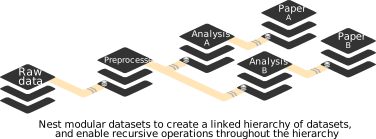
Let’s take a look at the history of the longnow subdataset. We can see that it has preserved its history completely. This means that the data we retrieved retains all of its provenance.
Code Output
commit 8df130bb825f99135c34b8bf0cbedb1b05edd581
Author: Michael Hanke <michael.hanke@gmail.com>
Date:   Mon Jul 16 16:08:23 2018 +0200

    [DATALAD] Set default backend for all files to be MD5E

commit 3d0dc8f5e9e4032784bc5a08d243995ad5cf92f9
Author: Michael Hanke <michael.hanke@gmail.com>
Date:   Mon Jul 16 16:08:24 2018 +0200

    [DATALAD] new dataset

commit b81bdea645d83c2ddef360faddafd0a778d03e1a
Author: Michael Hanke <michael.hanke@gmail.com>
Date:   Mon Jul 16 17:03:21 2018 +0200

    Import SALT feed

commit 9f3127fad2dbb3848d8d9a0ff85e6a151a47b50f
Author: Michael Hanke <michael.hanke@gmail.com>
Date:   Mon Jul 16 17:18:10 2018 +0200

    Import Interval feed

commit a052af9c059a82f36ee20ec708252568767ed067
Author: Michael Hanke <michael.hanke@gmail.com>
Date:   Mon Jul 16 17:30:47 2018 +0200

    Include publication date in the filename

commit ff007135c3c290c24ebdb2b3f1459236a25f7410
Author: Michael Hanke <michael.hanke@gmail.com>
Date:   Fri Dec 14 18:58:03 2018 +0100

    Update from feed

    Via: git annex importfeed --template '${feedtitle}/${itempubdate}__${itemtitle}${extension}' --force http://longnow.org/projects/seminars/SALT.xml

commit 7f36dea615f0fe117aed74a04ad325aacc714111
Author: Michael Hanke <michael.hanke@gmail.com>
Date:   Fri Dec 14 19:00:08 2018 +0100

    Update from feed

    Via: git annex importfeed --template '${feedtitle}/${itempubdate}__${itemtitle}${extension}' --force http://longnow.org/projects/seminars/interval.xml

commit 21d92907c1d05b246ea5eee805ac00c91366ae04
Author: Michael Hanke <michael.hanke@gmail.com>
Date:   Wed Jul 10 09:41:13 2019 +0200

    [DATALAD RUNCMD] Update Interval seminar series

    === Do not change lines below ===
    {
     "chain": [],
     "cmd": "git annex importfeed --template '${{feedtitle}}/${{itempubdate}}__${{itemtitle}}${{extension}}' --force http://longnow.org/projects/seminars/interval.xml",
     "dsid": "b3ca2718-8901-11e8-99aa-a0369f7c647e",
     "exit": 0,
     "extra_inputs": [],
     "inputs": [],
     "outputs": [],
     "pwd": "."
    }
    ^^^ Do not change lines above ^^^

commit e1bf31e3e91d97944b17c678036183e1d08d1598
Author: Michael Hanke <michael.hanke@gmail.com>
Date:   Wed Jul 10 09:43:02 2019 +0200

    [DATALAD RUNCMD] Update SALT series

    === Do not change lines below ===
    {
     "chain": [],
     "cmd": "git annex importfeed --template '${{feedtitle}}/${{itempubdate}}__${{itemtitle}}${{extension}}' --force http://longnow.org/projects/seminars/SALT.xml",
     "dsid": "b3ca2718-8901-11e8-99aa-a0369f7c647e",
     "exit": 0,
     "extra_inputs": [],
     "inputs": [],
     "outputs": [],
     "pwd": "."
    }
    ^^^ Do not change lines above ^^^

commit e64d00f3c00309ec35cc360011563cdba474978a
Author: Michael Hanke <michael.hanke@gmail.com>
Date:   Thu Jul 11 18:37:01 2019 +0200

    Prepare for addition of RSS feed metadata on episodes

commit f0831b9c00b6fd11359321aa6bb9e2c58557961f
Author: Michael Hanke <michael.hanke@gmail.com>
Date:   Thu Jul 11 18:42:08 2019 +0200

    Script to convert the RSS feed metadata into JSON-LD metadata

    For consumption by the `custom` metadata extractor

commit 9bece59fbd606290a124bbf9a3dc3218e4b7612e
Author: Michael Hanke <michael.hanke@gmail.com>
Date:   Thu Jul 11 18:48:51 2019 +0200

    Add duration to the metadata

commit ead809e901232746e89ab3c1ecacef4fcb0e6f49
Author: Michael Hanke <michael.hanke@gmail.com>
Date:   Thu Jul 11 19:18:30 2019 +0200

    Be resilient with different delimiters

commit 979bd25bd55538ff6f5efd1c780fc3bdc30c7701
Author: Michael Hanke <michael.hanke@gmail.com>
Date:   Thu Jul 11 19:19:04 2019 +0200

    Single update maintainer script

commit 3e96466a522e36c1cbe70cf577a322917b5961e9
Author: Michael Hanke <michael.hanke@gmail.com>
Date:   Thu Jul 11 19:23:56 2019 +0200

    More diff-able

commit 61f46fca4bc9b19e9e812353e3cf75a9edc7e694
Author: Michael Hanke <michael.hanke@gmail.com>
Date:   Thu Jul 11 19:27:50 2019 +0200

    Add base dataset metadata

commit 740fa141299f852d37dbb3dd58f964c0df4c8fd3
Author: Michael Hanke <michael.hanke@gmail.com>
Date:   Thu Jul 11 19:28:23 2019 +0200

    [DATALAD RUNCMD] Update from feed

    === Do not change lines below ===
    {
     "chain": [],
     "cmd": ".datalad/maint/update.sh",
     "dsid": "b3ca2718-8901-11e8-99aa-a0369f7c647e",
     "exit": 0,
     "extra_inputs": [],
     "inputs": [],
     "outputs": [],
     "pwd": "."
    }
    ^^^ Do not change lines above ^^^

commit 39226e9f8a9a11df3c8e86ca360f80f4c3a236e9
Author: Michael Hanke <michael.hanke@gmail.com>
Date:   Thu Jul 11 19:35:10 2019 +0200

    Update aggregated metadata

commit 0553111de6eb48deabd3efeee070cb7e070702aa
Author: Michael Hanke <michael.hanke@gmail.com>
Date:   Fri Jul 12 12:36:53 2019 +0200

    content removed from git annex

commit b9c517e007437677f1e0d54395a7852960a57918
Author: Michael Hanke <michael.hanke@gmail.com>
Date:   Fri Jul 12 12:37:16 2019 +0200

    Make sure extracted metadata is directly in Git

    to avoid the need for separate hosting

commit 5dd77723418c5c25bf49a29d55e8db273dd39217
Author: Michael Hanke <michael.hanke@gmail.com>
Date:   Fri Jul 12 12:38:16 2019 +0200

    Manually place extracted metadata in Git

commit 75d7f3fde28f63d14c506cfdd4bbf5e4854d83ec
Author: Michael Hanke <michael.hanke@gmail.com>
Date:   Mon Jul 15 07:10:28 2019 +0200

    Rename metadata directory

commit 1a396a641473ea95441c42891cf8dffdde837503
Author: Michael Hanke <michael.hanke@gmail.com>
Date:   Mon Jul 15 07:19:22 2019 +0200

    Prepare to annex big feed logos

commit 8053eed2a84780369cf156e3f856fbe57c0f688e
Author: Michael Hanke <michael.hanke@gmail.com>
Date:   Mon Jul 15 07:20:06 2019 +0200

    Add annexed feed logos

commit 80310175aa64035d0a18248cb882586d2e6ea394
Author: Michael Hanke <michael.hanke@gmail.com>
Date:   Mon Jul 15 07:50:44 2019 +0200

    Consolidate all metadata-related files under .datalad

    This prevents such content from being intermingled with the
    "intentional" dataset components.

commit 997e07abf57669dcf818bffdc819fa92eddf5659
Author: Michael Hanke <michael.hanke@gmail.com>
Date:   Mon Jul 15 07:51:50 2019 +0200

    Update aggregated metadata

commit 43fdea19c2f87c70c3317c8886d4701b8acfe708
Author: Michael Hanke <michael.hanke@gmail.com>
Date:   Mon Jul 15 09:57:35 2019 +0200

    Add script to generate a README from DataLad metadata

commit 4b37790cd97f03a7807f82f20497218dc18898d0
Author: Michael Hanke <michael.hanke@gmail.com>
Date:   Mon Jul 15 10:03:27 2019 +0200

    Fix README generator to parse correct directory

commit e8296151fa2d1592791c8882a1c10c00c523267c
Author: Michael Hanke <michael.hanke@gmail.com>
Date:   Mon Jul 15 10:10:27 2019 +0200

    Link to the handbook as a source of wisdom

commit 7ee3ded7f0c18dc767fc32c850b57a03fcb792b9
Author: Michael Hanke <michael.hanke@gmail.com>
Date:   Mon Jul 15 10:22:06 2019 +0200

    Sort episodes newest-first

commit 004e484d05a93c6ca46438ffe7878f8e3d53312e
Author: Michael Hanke <michael.hanke@gmail.com>
Date:   Mon Jul 15 10:22:38 2019 +0200

    [DATALAD RUNCMD] .datalad/maint/make_readme.py

    === Do not change lines below ===
    {
     "chain": [],
     "cmd": ".datalad/maint/make_readme.py",
     "dsid": "b3ca2718-8901-11e8-99aa-a0369f7c647e",
     "exit": 0,
     "extra_inputs": [],
     "inputs": [
      ".datalad/maint/README.md.in"
     ],
     "outputs": [
      "README.md"
     ],
     "pwd": "."
    }
    ^^^ Do not change lines above ^^^

commit bafdc041eac093760faa7cab3ca6196da99a39d9
Author: Michael Hanke <michael.hanke@gmail.com>
Date:   Mon Jul 15 12:45:36 2019 +0200

    Uniformize JSON-LD context with DataLad's internal extractors

    This makes it easier to merge documents for a joint report.

commit 36a30a1a1d8725658410b650d516d9d3c640427d
Author: Michael Hanke <michael.hanke@gmail.com>
Date:   Mon Jul 15 12:59:27 2019 +0200

    [DATALAD RUNCMD] Update from feed

    === Do not change lines below ===
    {
     "chain": [
      "740fa141299f852d37dbb3dd58f964c0df4c8fd3"
     ],
     "cmd": ".datalad/maint/update.sh",
     "dsid": "b3ca2718-8901-11e8-99aa-a0369f7c647e",
     "exit": 0,
     "extra_inputs": [],
     "inputs": [],
     "outputs": [],
     "pwd": "."
    }
    ^^^ Do not change lines above ^^^

commit dcc34fbe669b06ced84ced381ba0db21cf5e665f (HEAD -> master, origin/master, origin/HEAD)
Author: Michael Hanke <michael.hanke@gmail.com>
Date:   Mon Jul 15 13:06:52 2019 +0200

    Update aggregated metadata
The git log --reverse command shows the commit history in reverse chronological order (oldest first). This is useful to see how a repository evolved from its beginning. Key points about subdataset history:
- Complete history: The subdataset retains its full development history
- Provenance: You can trace exactly how the data was created and modified
- Independent versioning: The subdataset has its own version history separate from the parent dataset
- Transparency: You can see who contributed what and when
This preserved history is crucial for reproducible research and data transparency. How does this look in the top-level dataset? If we query the history of DataLad-101, there will be no commits related to MP3 files or any of the commits we have seen in the subdataset. Instead, we can see that the superdataset recorded the recordings/longnow dataset as a subdataset. This means it recorded where this dataset came from and what version it is in.
Code Output
commit af804cb4e0787be6b16c237cf5f697fb4ec054c6 (HEAD -> master)
Author: Ford Escort <42@H2G2.com>
Date:   Fri May 8 07:19:25 2026 +0000

    [DATALAD] Added subdataset
This demonstrates an important concept in DataLad dataset nesting:
- Parent dataset: Records subdatasets as references, not their full content
- Version pinning: The parent dataset tracks exactly which version of the subdataset is being used
- Separation of concerns: Each dataset maintains its own history independently
- Reproducibility: You can recreate the exact same combination of datasets later
This approach allows for modular project organization while maintaining precise version control.
The subproject commit registered the most recent commit of the subdataset, and thus the subdataset version:
Code Output
dcc34fb (HEAD -> master, origin/master, origin/HEAD) Update aggregated metadata
36a30a1 [DATALAD RUNCMD] Update from feed
bafdc04 Uniformize JSON-LD context with DataLad's internal extractors
004e484 [DATALAD RUNCMD] .datalad/maint/make_readme.py
7ee3ded Sort episodes newest-first
e829615 Link to the handbook as a source of wisdom
4b37790 Fix README generator to parse correct directory
43fdea1 Add script to generate a README from DataLad metadata
997e07a Update aggregated metadata
8031017 Consolidate all metadata-related files under .datalad
8053eed Add annexed feed logos
1a396a6 Prepare to annex big feed logos
75d7f3f Rename metadata directory
5dd7772 Manually place extracted metadata in Git
b9c517e Make sure extracted metadata is directly in Git
0553111 content removed from git annex
39226e9 Update aggregated metadata
740fa14 [DATALAD RUNCMD] Update from feed
61f46fc Add base dataset metadata
3e96466 More diff-able
979bd25 Single update maintainer script
ead809e Be resilient with different delimiters
9bece59 Add duration to the metadata
f0831b9 Script to convert the RSS feed metadata into JSON-LD metadata
e64d00f Prepare for addition of RSS feed metadata on episodes
e1bf31e [DATALAD RUNCMD] Update SALT series
21d9290 [DATALAD RUNCMD] Update Interval seminar series
7f36dea Update from feed
ff00713 Update from feed
a052af9 Include publication date in the filename
9f3127f Import Interval feed
b81bdea Import SALT feed
3d0dc8f [DATALAD] new dataset
8df130b [DATALAD] Set default backend for all files to be MD5E
The git log --oneline command shows a condensed view of the commit history:
- Each commit is shown on one line
- Shows the short commit hash (first 7 characters)
- Shows only the commit message (no author, date, etc.)
This format is useful when you want a quick overview of what changes have been made without the full details. The commit hash displayed here is what the parent dataset uses to track which specific version of the subdataset is being used.
More on data versioning, nesting, and a glimpse into reproducible paper
We’ll clone a repository for a paper that shares manuscript, code, and data:
Code Output
Cloning:   0%|                             | 0.00/2.00 [00:00<?, ? candidates/s]


Enumerating: 0.00 Objects [00:00, ? Objects/s]


Counting:   0%|                                | 0.00/802 [00:00<?, ? Objects/s]


Compressing:   0%|                             | 0.00/375 [00:00<?, ? Objects/s]


Receiving:   0%|                             | 0.00/2.11k [00:00<?, ? Objects/s]


Receiving:  19%|████▏                 | 401/2.11k [00:00<00:00, 3.50k Objects/s]


Receiving:  36%|████████▋               | 760/2.11k [00:00<00:01, 997 Objects/s]


Receiving:  53%|██████████▌         | 1.12k/2.11k [00:00<00:00, 1.39k Objects/s]


Resolving:   0%|                              | 0.00/1.09k [00:00<?, ? Deltas/s]


[INFO   ] Remote origin not usable by git-annex; setting annex-ignore

[INFO   ] https://github.com/psychoinformatics-de/paper-remodnav.git/config download failed: Not Found

install(ok): /app/paper-remodnav (dataset)
The top-level dataset has many subdatasets. One of them, remodnav, is a dataset that contains the source code for a Python package called remodnav used in eye-tracking analyses:
Code Output
subdataset(ok): data/raw_eyegaze (dataset)

subdataset(ok): data/studyforrest-data-eyemovementlabels (dataset)

subdataset(ok): remodnav (dataset)
The datalad subdatasets command lists all subdatasets contained within the current dataset. For each subdataset, it shows:
- Path: Where the subdataset is located within the parent dataset
- URL: The source location of the subdataset
- Status: Whether it’s installed or just registered
This gives you a complete overview of the dataset’s modular structure and dependencies. Complex research projects often involve multiple datasets, and this command helps you understand the relationships between them.
After cloning a dataset, its subdatasets will be recognized, but just as content is not yet retrieved for files in datasets, the subdatasets of datasets are not yet installed. If we navigate into an uninstalled subdataset, it will appear as an empty directory.
In order to install a subdataset, we use datalad get with the --recursive flag:
Code Output
Cloning:   0%|                             | 0.00/4.00 [00:00<?, ? candidates/s]


Enumerating: 0.00 Objects [00:00, ? Objects/s]


Counting:   0%|                                | 0.00/106 [00:00<?, ? Objects/s]


Compressing:   0%|                            | 0.00/26.0 [00:00<?, ? Objects/s]


Receiving:   0%|                               | 0.00/443 [00:00<?, ? Objects/s]


Resolving:   0%|                                | 0.00/244 [00:00<?, ? Deltas/s]


[INFO   ] Reset branch 'master' to d2891183 (from 5e0dffeb) to avoid a detached HEAD

install(ok): /app/paper-remodnav/remodnav (dataset) [Installed subdataset in order to get /app/paper-remodnav/remodnav]

[INFO   ] Ensuring presence of Dataset(/app/paper-remodnav) to get /app/paper-remodnav/remodnav


Installing: 0.00 datasets [00:00, ? datasets/s]
Installing:   0%|                            | 0.00/1.00 [00:00<?, ? datasets/s]
Installing:   0%|                            | 0.00/1.00 [00:00<?, ? datasets/s]


Cloning:   0%|                             | 0.00/4.00 [00:00<?, ? candidates/s]


Enumerating: 0.00 Objects [00:00, ? Objects/s]


Counting:   0%|                               | 0.00/18.0 [00:00<?, ? Objects/s]


Compressing:   0%|                            | 0.00/16.0 [00:00<?, ? Objects/s]


Receiving:   0%|                               | 0.00/197 [00:00<?, ? Objects/s]


Receiving:   9%|██▏                     | 18.0/197 [00:00<00:03, 51.4 Objects/s]


Receiving:  12%|██▉                     | 24.0/197 [00:00<00:04, 35.7 Objects/s]


Receiving:  14%|███▍                    | 28.0/197 [00:01<00:10, 15.5 Objects/s]


Resolving:   0%|                               | 0.00/16.0 [00:00<?, ? Deltas/s]


[INFO   ] Reset branch 'master' to 0e6f8270 (from 3e12416a) to avoid a detached HEAD


Installing (1 skipped): 100%|█████████| 1.00/1.00 [00:02<00:00, 2.32s/ datasets]
Installing (1 skipped):   0%|                | 0.00/3.00 [00:00<?, ? datasets/s]
Installing (1 skipped):  33%|██▋     | 1.00/3.00 [00:00<00:00, 3.13k datasets/s]

install(ok): /app/paper-remodnav/remodnav/remodnav/tests/data/anderson_etal (dataset)


Installing (1 skipped):  67%|█████▎  | 2.00/3.00 [00:00<00:00, 2.40k datasets/s]


Cloning:   0%|                             | 0.00/4.00 [00:00<?, ? candidates/s]


Enumerating: 0.00 Objects [00:00, ? Objects/s]


Counting:   0%|                              | 0.00/7.96k [00:00<?, ? Objects/s]


Compressing:   0%|                           | 0.00/6.78k [00:00<?, ? Objects/s]


Receiving:   0%|                             | 0.00/54.8k [00:00<?, ? Objects/s]


Receiving:   3%|▌                   | 1.65k/54.8k [00:00<00:04, 12.4k Objects/s]


Receiving:   9%|█▊                  | 4.93k/54.8k [00:00<00:02, 20.2k Objects/s]


Receiving:  26%|█████▏              | 14.2k/54.8k [00:00<00:00, 43.6k Objects/s]


Receiving:  49%|█████████▊          | 26.9k/54.8k [00:00<00:00, 71.0k Objects/s]


Receiving:  74%|██████████████▊     | 40.6k/54.8k [00:00<00:00, 86.9k Objects/s]


Resolving:   0%|                              | 0.00/4.32k [00:00<?, ? Deltas/s]


[INFO   ] Remote origin not usable by git-annex; setting annex-ignore


Installing (1 skipped):  67%|██████   | 2.00/3.00 [00:01<00:00, 1.06 datasets/s]

[INFO   ] https://github.com/psychoinformatics-de/studyforrest-data-phase2.git/config download failed: Not Found


Installing (1 skipped):  67%|██████   | 2.00/3.00 [00:01<00:00, 1.06 datasets/s]

[INFO   ] RIA store unavailable. -caused by- Failed to access http://studyforrest.ds.inm7.de/ria-layout-version -caused by- Failed to access http://studyforrest.ds.inm7.de/ria-layout-version -caused by- Failed to establish a new session 1 times.  -caused by- HTTPConnectionPool(host='studyforrest.ds.inm7.de', port=80): Max retries exceeded with url: /ria-layout-version (Caused by NameResolutionError("HTTPConnection(host='studyforrest.ds.inm7.de', port=80): Failed to resolve 'studyforrest.ds.inm7.de' ([Errno -2] Name or service not known)"))


Installing (1 skipped):  67%|██████   | 2.00/3.00 [00:02<00:01, 1.28s/ datasets]

[INFO   ] Reset branch 'master' to a6623bff (from 01ed4601) to avoid a detached HEAD


Installing (1 skipped):  67%|██████   | 2.00/3.00 [00:04<00:02, 2.10s/ datasets]
Installing (1 skipped): 100%|█████████| 3.00/3.00 [00:04<00:00, 1.41s/ datasets]

install(ok): /app/paper-remodnav/remodnav/remodnav/tests/data/studyforrest (dataset)


Installing (1 skipped): 100%|█████████| 3.00/3.00 [00:04<00:00, 1.41s/ datasets]

action summary:

  install (ok: 3)
This command demonstrates several advanced DataLad options:
--recursive: Operates on subdatasets as well as the current dataset--recursion-limit 2: Limits how deep the recursion goes (prevents going too deep in nested structures)-n: “No data” mode - installs subdatasets without downloading their actual content.: Operates on the current directory
This approach is useful when you want to explore the structure of a complex project without downloading potentially large amounts of data upfront. You get access to all the metadata and organization without the storage burden.
Code Output
CHANGELOG.md  LICENSE   README.md  remodnav        setup.py
CONTRIBUTORS  Makefile  eval       requirements-devel.txt
This command not only retrieves file contents, but it also installs subdatasets. So, if you want to be really lazy, just run datalad get --recursive -n in the root of a dataset to install all available subdatasets. The -n option prevents get from downloading any data, so only the subdatasets are installed without any data being downloaded. Here, the depth of recursion is limited. For one, it would take a while to install all subdatasets, but the very raw eye-tracking dataset contains subject IDs that should not be shared. Therefore, this subdataset is not accessible. If you try to install all subdatasets, the source eye-tracking data will throw an error, because it is not made publicly available.
This demonstrates important concepts in data management:
- Privacy and ethics: Some data cannot be publicly shared due to privacy concerns
- Selective access: DataLad can handle mixed public/private data scenarios
- Efficient exploration: You can survey large project structures without downloading everything
- Graceful failure: DataLad will continue processing available datasets even if some are inaccessible
The “lazy” approach (installing structure without data) is often the best way to start exploring unfamiliar datasets.
Afterwards, you can see that the remodnav subdataset also contains further subdatasets. In this case, these subdatasets contain data used for testing and validating software performance.
Code Output
subdataset(ok): remodnav/tests/data/anderson_etal (dataset)

subdataset(ok): remodnav/tests/data/studyforrest (dataset)
One of the validation data subdatasets came from another lab that shared their data. After the researchers were almost finished with their paper, they found another paper that reported a mistake in this data. The mistake was still present in the data they were using. By inspecting the history of this dataset, you can see that at one point, they contributed a fix that changed the data.
Code Output
commit 0e6f82708e10b48039763aa1078696e802260674 (HEAD -> master)
Merge: c6d0253 b950b59
Author: Richard Andersson <richardandersson@users.noreply.github.com>
Date:   Fri Mar 8 12:38:45 2019 +0100

    Merge pull request #3 from AdinaWagner/datafix

    ENH/FIX: relabel erroneous saccades to fixations.

commit b950b59fecfd1bb17f47b143589d94547cb6f9ac
Author: Adina Wagner <adina.wagner@t-online.de>
Date:   Fri Mar 8 11:35:47 2019 +0100

    ENH/FIX: relabel erroneous saccades to fixations, closes #2.

    As reported in: http://sci-hub.tw/https://link.springer.com/article/10.3758/s13428-018-1133-5

commit c6d02539712d12d7bea96912521a43cb84e7a7b8
Author: Richard Andersson <richardandersson@users.noreply.github.com>
Date:   Wed Dec 5 15:27:50 2018 +0100

    Uploaded a folder consting only of the data used in the original article
This example illustrates several important aspects of scientific data management:
- Data errors happen: Even published data can contain mistakes
- Version control helps: You can track exactly when and how data was corrected
- Transparency: The fix is documented and visible in the history
- Collaboration: Researchers can contribute improvements to shared datasets
- Impact assessment: You can see exactly what changed between versions
The ability to track and correct data errors while maintaining complete provenance is crucial for scientific reproducibility.
Because DataLad can link subdatasets to precise versions, it is possible to consciously decide and openly record which version of the data is used. It is also possible to test how much results change by resetting the subdataset to an earlier state or updating the dataset to a more recent version.
Full provenance capture and reproducibility
DataLad allows you to capture full provenance (i.e., a record that describes entities and processes that were involved in producing or influencing a digital resource): The origin of datasets, the origin of files obtained from web sources, complete machine-readable and automatically reproducible records of how files were created (including software environments). You or your collaborators can thus re-obtain or reproducibly recompute content with a single command, and make use of extensive provenance of dataset content (who created it, when, and how?).
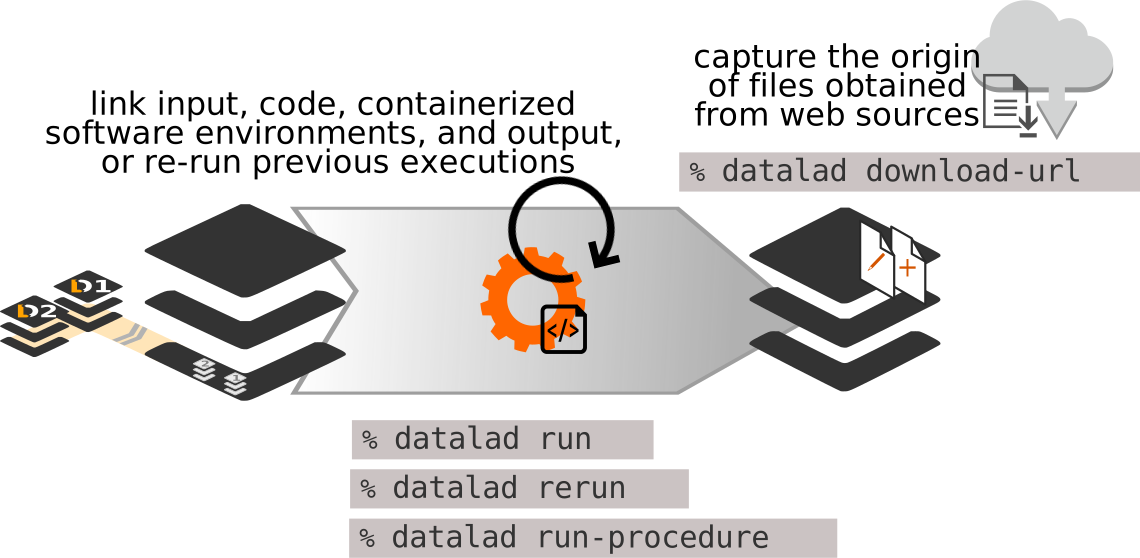
First, create a new dataset, in this case with the yoda configuration:
Code Output
[INFO   ] Running procedure cfg_yoda

[INFO   ] == Command start (output follows) =====


Total: 0.00 datasets [00:00, ? datasets/s]


Total:   0%|                                     | 0.00/510 [00:00<?, ? Bytes/s]


Total:   0%|                                 | 0.00/1.00 [00:00<?, ? datasets/s]
Total:   0%|                                 | 0.00/1.00 [00:00<?, ? datasets/s]

[INFO   ] == Command exit (modification check follows) =====

run(ok): /app/myanalysis (dataset) [/app/.venv/bin/python /app/.venv/lib/pyt...]

create(ok): /app/myanalysis (dataset)

action summary:

  create (ok: 1)

  run (ok: 1)
The yoda configuration sets up a dataset following the YODA principles (YODA = “YODa’s Organigram on Data Analyses”):
- Structured organization: Creates a logical directory structure for data analysis projects
- Separation of concerns: Keeps code, data, and outputs in separate locations
- Reproducibility: Establishes conventions that support reproducible research
- Best practices: Applies proven configurations for data analysis workflows
This configuration is specifically designed for data analysis projects and provides a standardized way to organize research.
This sets up a helpful structure for the dataset with a code directory and some README files, and applies helpful configurations:
The YODA configuration creates several key directories and files:
code/: Where you store your analysis scripts and source codeREADME.md: Documentation for your project.datalad/: DataLad configuration and metadata (hidden directory)- Configuration settings: Optimized for typical data analysis workflows
This structure follows research data management best practices:
- Clear separation between code and data
- Documentation is prominently placed
- Ready for immediate use in data analysis projects
Read more about the YODA principles and the YODA configuration in the section on YODA in the DataLad Handbook.
Next, install the input data as a subdataset. For this, the DataLad developers created a DataLad dataset with the “iris” data and published it on GitHub. Here, we’re installing it into a directory named input.
Code Output
Cloning:   0%|                             | 0.00/2.00 [00:00<?, ? candidates/s]


Enumerating: 0.00 Objects [00:00, ? Objects/s]


Counting:   0%|                               | 0.00/25.0 [00:00<?, ? Objects/s]


Compressing:   0%|                            | 0.00/19.0 [00:00<?, ? Objects/s]


Receiving:   0%|                              | 0.00/25.0 [00:00<?, ? Objects/s]


Resolving:   0%|                               | 0.00/3.00 [00:00<?, ? Deltas/s]


[INFO   ] Remote origin not usable by git-annex; setting annex-ignore

[INFO   ] https://github.com/datalad-handbook/iris_data.git/config download failed: Not Found

install(ok): input (dataset)


Total: 0.00 datasets [00:00, ? datasets/s]
Total:   0%|                                 | 0.00/1.00 [00:00<?, ? datasets/s]
Total:   0%|                                 | 0.00/1.00 [00:00<?, ? datasets/s]

add(ok): input (dataset)


Total:   0%|                                 | 0.00/1.00 [00:00<?, ? datasets/s]


Total:   0%|                                     | 0.00/142 [00:00<?, ? Bytes/s]


add(ok): .gitmodules (file)


Total:   0%|                                 | 0.00/1.00 [00:00<?, ? datasets/s]


Total:   0%|                                     | 0.00/142 [00:00<?, ? Bytes/s]


Total: 100%|██████████████████████████| 1.00/1.00 [00:00<00:00, 6.22 datasets/s]

save(ok): . (dataset)


Total: 100%|██████████████████████████| 1.00/1.00 [00:00<00:00, 6.20 datasets/s]


Total: 0.00 datasets [00:00, ? datasets/s]
Total:   0%|                                 | 0.00/1.00 [00:00<?, ? datasets/s]
Total:   0%|                                 | 0.00/1.00 [00:00<?, ? datasets/s]

add(ok): .gitmodules (file)


Total:   0%|                                 | 0.00/1.00 [00:00<?, ? datasets/s]

save(ok): . (dataset)


Total: 100%|██████████████████████████| 1.00/1.00 [00:00<00:00, 15.3 datasets/s]

action summary:

  add (ok: 3)

  install (ok: 1)

  save (ok: 2)
This command demonstrates a key YODA principle - input data should be separate from your analysis code: - datalad clone -d . installs the dataset as a subdataset of the current dataset - The iris dataset is a classic machine learning dataset (flower measurements) - Installing as input/ clearly identifies this as input data for the analysis - The data remains linked to its original source for provenance tracking
By organizing data this way, you maintain clear boundaries between: - Input data: What you’re analyzing (should not be modified) - Code: How you’re analyzing it - Results: What you discover (generated by your analysis)
The last thing needed is code to run on the data and produce results. For this, here is a k-nearest neighbors (kNN) classification analysis script written in Python. You can find more details about this analysis in the section on a YODA-compliant data analysis project.
cat << EOT > code/script.py

import pandas as pd
import seaborn as sns
import datalad.api as dl
from sklearn import model_selection
from sklearn.neighbors import KNeighborsClassifier
from sklearn.metrics import classification_report

data = "input/iris.csv"

# make sure that the data are obtained (get will also install linked sub-ds!):
dl.get(data)

# prepare the data as a pandas dataframe
df = pd.read_csv(data)
attributes = ["sepal_length", "sepal_width", "petal_length","petal_width", "class"]
df.columns = attributes

# create a pairplot to plot pairwise relationships in the dataset
plot = sns.pairplot(df, hue='class', palette='muted')
plot.savefig('pairwise_relationships.png')

# perform a K-nearest-neighbours classification with scikit-learn
# Step 1: split data in test and training dataset (20:80)
array = df.values
X = array[:,0:4]
Y = array[:,4]
test_size = 0.20
seed = 7
X_train, X_test, Y_train, Y_test = model_selection.train_test_split(X, Y,
                                                                    test_size=test_size,
                                                                    random_state=seed)
# Step 2: Fit the model and make predictions on the test dataset
knn = KNeighborsClassifier()
knn.fit(X_train, Y_train)
predictions = knn.predict(X_test)

# Step 3: Save the classification report
report = classification_report(Y_test, predictions, output_dict=True)
df_report = pd.DataFrame(report).transpose().to_csv('prediction_report.csv')

EOT
So far the script is untracked:
Let’s save it with a datalad save command:
Code Output
Total: 0.00 datasets [00:00, ? datasets/s]


Total:   0%|                                   | 0.00/1.46k [00:00<?, ? Bytes/s]


Total:   0%|                                 | 0.00/1.00 [00:00<?, ? datasets/s]
Total:   0%|                                 | 0.00/1.00 [00:00<?, ? datasets/s]

add(ok): code/script.py (file)


Total:   0%|                                 | 0.00/1.00 [00:00<?, ? datasets/s]

save(ok): . (dataset)


Total: 100%|██████████████████████████| 1.00/1.00 [00:00<00:00, 15.5 datasets/s]

action summary:

  add (ok: 1)

  save (ok: 1)
datalad run
The challenge that DataLad helps accomplish is running this script in a way that links the script to the results it produces and the data it was computed from. We can do this with the datalad run command. In principle, it is simple. You start with a clean dataset:
Then, give the command you would execute with datalad run, in this case python code/script.py. DataLad will take the command, run it, and save all of the changes in the dataset under the commit message specified with the -m option. Thus, it associates the script with the results.
But it can be even more helpful. Here, we also specify the input data that the command needs, and DataLad will retrieve the data beforehand. We also specify the output of the command. Specifying the outputs will allow us to rerun the command later and update any outdated results.
Code Output
[INFO   ] Making sure inputs are available (this may take some time)


Total:   0%|                                   | 0.00/3.98k [00:00<?, ? Bytes/s]


Get iris.csv:   0%|                            | 0.00/3.98k [00:00<?, ? Bytes/s]


get(ok): input/iris.csv (file) [from web...]

[INFO   ] == Command start (output follows) =====

action summary:

  get (notneeded: 2)

[INFO   ] == Command exit (modification check follows) =====

run(ok): /app/myanalysis (dataset) [python3 code/script.py]


Total: 0.00 datasets [00:00, ? datasets/s]
Total:   0%|                                 | 0.00/2.00 [00:00<?, ? datasets/s]
Total:   0%|                                 | 0.00/2.00 [00:00<?, ? datasets/s]


Total:   0%|                                    | 0.00/261k [00:00<?, ? Bytes/s]


add(ok): pairwise_relationships.png (file)


Total (1 skipped):  50%|███████       | 1.00/2.00 [00:00<00:00, 7.75 datasets/s]

add(ok): prediction_report.csv (file)


Total (1 skipped):  50%|███████       | 1.00/2.00 [00:00<00:00, 7.73 datasets/s]
Total (1 skipped): 100%|██████████████| 2.00/2.00 [00:00<00:00, 15.4 datasets/s]

save(ok): . (dataset)


Total (1 skipped): 100%|██████████████| 2.00/2.00 [00:00<00:00, 15.4 datasets/s]
The datalad run command is a powerful tool for reproducible computational workflows:
Core features:
- Command execution: Runs your specified command
- Input tracking: Records what data the command uses (
--input) - Output tracking: Records what files the command produces (
--output) - Automatic saving: Commits all changes with the provided message
- Provenance recording: Creates a machine-readable record of the entire process
Why this matters:
- Reproducibility: Others can see exactly how results were generated
- Dependency tracking: DataLad knows what data is needed to recreate results
- Change detection: Can identify when inputs change and outputs need updating
- Automation: The entire analysis becomes repeatable with a single command
DataLad creates a commit in the dataset history. This commit includes the commit message as a human-readable summary of what was done. It contains the produced output, and it has a machine-readable record that includes information on the input data, the results, and the command that was run to create this result.
Code Output
commit 7a3ecc056f5a30b2861710c052e2f0c4d52c51d5 (HEAD -> master)
Author: Ford Escort <42@H2G2.com>
Date:   Fri May 8 07:20:00 2026 +0000

    [DATALAD RUNCMD] Analyze iris data with classification analysis

    === Do not change lines below ===
    {
     "chain": [],
     "cmd": "python3 code/script.py",
     "dsid": "da73667c-2f5c-41b9-a8e2-d9bb552eb016",
     "exit": 0,
     "extra_inputs": [],
     "inputs": [
      "input/iris.csv"
     ],
     "outputs": [
      "prediction_report.csv",
      "pairwise_relationships.png"
     ],
     "pwd": "."
    }
    ^^^ Do not change lines above ^^^
This commit contains several types of information:
Human-readable: - Commit message: Describes what analysis was performed - Changed files: Shows what outputs were generated - Author and timestamp: Who ran the analysis and when
Machine-readable provenance: - Exact command: The complete command that was executed - Input dependencies: Which files were used as inputs - Output products: Which files were generated - Environment information: Details about the computational environment
This rich metadata enables both humans and computers to understand exactly how results were produced.
datalad rerun
This machine-readable record is particularly helpful, because we can now instruct DataLad to rerun this command. This means we don’t have to memorize what we did, and people that we share the dataset with don’t need to ask how this result was produced. They can simply let DataLad tell them.
This is accomplished with the datalad rerun command. For this demonstration, we have prepared this analysis dataset and published it to GitHub at https://github.com/lnnrtwttkhn/datalad-tutorial-myanalysis.
Code Output
Cloning into 'analysis_clone'...
remote: Enumerating objects: 37, done.
remote: Counting objects:   2% (1/37)        remote: Counting objects:   5% (2/37)        remote: Counting objects:   8% (3/37)        remote: Counting objects:  10% (4/37)        remote: Counting objects:  13% (5/37)        remote: Counting objects:  16% (6/37)        remote: Counting objects:  18% (7/37)        remote: Counting objects:  21% (8/37)        remote: Counting objects:  24% (9/37)        remote: Counting objects:  27% (10/37)        remote: Counting objects:  29% (11/37)        remote: Counting objects:  32% (12/37)        remote: Counting objects:  35% (13/37)        remote: Counting objects:  37% (14/37)        remote: Counting objects:  40% (15/37)        remote: Counting objects:  43% (16/37)        remote: Counting objects:  45% (17/37)        remote: Counting objects:  48% (18/37)        remote: Counting objects:  51% (19/37)        remote: Counting objects:  54% (20/37)        remote: Counting objects:  56% (21/37)        remote: Counting objects:  59% (22/37)        remote: Counting objects:  62% (23/37)        remote: Counting objects:  64% (24/37)        remote: Counting objects:  67% (25/37)        remote: Counting objects:  70% (26/37)        remote: Counting objects:  72% (27/37)        remote: Counting objects:  75% (28/37)        remote: Counting objects:  78% (29/37)        remote: Counting objects:  81% (30/37)        remote: Counting objects:  83% (31/37)        remote: Counting objects:  86% (32/37)        remote: Counting objects:  89% (33/37)        remote: Counting objects:  91% (34/37)        remote: Counting objects:  94% (35/37)        remote: Counting objects:  97% (36/37)        remote: Counting objects: 100% (37/37)        remote: Counting objects: 100% (37/37), done.
remote: Compressing objects:   4% (1/24)        remote: Compressing objects:   8% (2/24)        remote: Compressing objects:  12% (3/24)        remote: Compressing objects:  16% (4/24)        remote: Compressing objects:  20% (5/24)        remote: Compressing objects:  25% (6/24)        remote: Compressing objects:  29% (7/24)        remote: Compressing objects:  33% (8/24)        remote: Compressing objects:  37% (9/24)        remote: Compressing objects:  41% (10/24)        remote: Compressing objects:  45% (11/24)        remote: Compressing objects:  50% (12/24)        remote: Compressing objects:  54% (13/24)        remote: Compressing objects:  58% (14/24)        remote: Compressing objects:  62% (15/24)        remote: Compressing objects:  66% (16/24)        remote: Compressing objects:  70% (17/24)        remote: Compressing objects:  75% (18/24)        remote: Compressing objects:  79% (19/24)        remote: Compressing objects:  83% (20/24)        remote: Compressing objects:  87% (21/24)        remote: Compressing objects:  91% (22/24)        remote: Compressing objects:  95% (23/24)        remote: Compressing objects: 100% (24/24)        remote: Compressing objects: 100% (24/24), done.
remote: Total 37 (delta 6), reused 37 (delta 6), pack-reused 0 (from 0)
Receiving objects:   2% (1/37)Receiving objects:   5% (2/37)Receiving objects:   8% (3/37)Receiving objects:  10% (4/37)Receiving objects:  13% (5/37)Receiving objects:  16% (6/37)Receiving objects:  18% (7/37)Receiving objects:  21% (8/37)Receiving objects:  24% (9/37)Receiving objects:  27% (10/37)Receiving objects:  29% (11/37)Receiving objects:  32% (12/37)Receiving objects:  35% (13/37)Receiving objects:  37% (14/37)Receiving objects:  40% (15/37)Receiving objects:  43% (16/37)Receiving objects:  45% (17/37)Receiving objects:  48% (18/37)Receiving objects:  51% (19/37)Receiving objects:  54% (20/37)Receiving objects:  56% (21/37)Receiving objects:  59% (22/37)Receiving objects:  62% (23/37)Receiving objects:  64% (24/37)Receiving objects:  67% (25/37)Receiving objects:  70% (26/37)Receiving objects:  72% (27/37)Receiving objects:  75% (28/37)Receiving objects:  78% (29/37)Receiving objects:  81% (30/37)Receiving objects:  83% (31/37)Receiving objects:  86% (32/37)Receiving objects:  89% (33/37)Receiving objects:  91% (34/37)Receiving objects:  94% (35/37)Receiving objects:  97% (36/37)Receiving objects: 100% (37/37)Receiving objects: 100% (37/37), 4.22 KiB | 4.22 MiB/s, done.
Resolving deltas: 0% (0/6)Resolving deltas: 16% (1/6)Resolving deltas: 33% (2/6)Resolving deltas: 50% (3/6)Resolving deltas: 66% (4/6)Resolving deltas: 83% (5/6)Resolving deltas: 100% (6/6)Resolving deltas: 100% (6/6), done.We can clone this repository and provide, for example, the checksum of the run command to the datalad rerun command. DataLad will read the machine-readable record of what was done and recompute the exact same thing.
Code Output
[INFO   ] run commit 3bb049d; (Analyze iris data...)

[INFO   ] Making sure inputs are available (this may take some time)


Cloning:   0%|                             | 0.00/4.00 [00:00<?, ? candidates/s]


Enumerating: 0.00 Objects [00:00, ? Objects/s]


Counting:   0%|                               | 0.00/25.0 [00:00<?, ? Objects/s]


Compressing:   0%|                            | 0.00/19.0 [00:00<?, ? Objects/s]


Receiving:   0%|                              | 0.00/25.0 [00:00<?, ? Objects/s]


Resolving:   0%|                               | 0.00/3.00 [00:00<?, ? Deltas/s]


[INFO   ] Remote origin not usable by git-annex; setting annex-ignore

[INFO   ] https://github.com/datalad-handbook/iris_data.git/config download failed: Not Found

install(ok): input (dataset) [Installed subdataset in order to get /app/analysis_clone/input]


Total:   0%|                                   | 0.00/3.98k [00:00<?, ? Bytes/s]


Get iris.csv:   0%|                            | 0.00/3.98k [00:00<?, ? Bytes/s]


get(ok): input/iris.csv (file) [from web...]

run.remove(ok): pairwise_relationships.png (file) [Removed file]

run.remove(ok): prediction_report.csv (file) [Removed file]

[INFO   ] == Command start (output follows) =====

action summary:

  get (notneeded: 2)

[INFO   ] == Command exit (modification check follows) =====

run(ok): /app/analysis_clone (dataset) [python3 code/script.py]


Total: 0.00 datasets [00:00, ? datasets/s]
Total:   0%|                                 | 0.00/2.00 [00:00<?, ? datasets/s]
Total:   0%|                                 | 0.00/2.00 [00:00<?, ? datasets/s]


Total:   0%|                                    | 0.00/261k [00:00<?, ? Bytes/s]


add(ok): pairwise_relationships.png (file)


Total (1 skipped):  50%|███████       | 1.00/2.00 [00:00<00:00, 7.78 datasets/s]

add(ok): prediction_report.csv (file)


Total (1 skipped):  50%|███████       | 1.00/2.00 [00:00<00:00, 7.76 datasets/s]
Total (1 skipped): 100%|██████████████| 2.00/2.00 [00:00<00:00, 15.5 datasets/s]

save(ok): . (dataset)


Total (1 skipped): 100%|██████████████| 2.00/2.00 [00:00<00:00, 15.5 datasets/s]

action summary:

  add (ok: 2)

  get (notneeded: 1, ok: 1)

  install (ok: 1)

  run (ok: 1)

  run.remove (ok: 2)

  save (notneeded: 1, ok: 1)
The datalad rerun command demonstrates the ultimate goal of reproducible research:
What datalad rerun does: - Reads the provenance record: Extracts the exact command, inputs, and outputs from the commit - Recreates the environment: Sets up the same conditions as the original run - Re-executes the command: Runs the exact same command that generated the original results - Validates outputs: Ensures the results match what was originally produced
Why this is revolutionary: - Perfect reproducibility: No ambiguity about how results were generated - Effortless replication: Others can reproduce your work with a single command - Dependency management: DataLad automatically retrieves required input data - Update workflows: Easily update results when input data or code changes - Scientific transparency: Computational methods become fully transparent
This capability transforms scientific computing from “trust me, this is how I did it” to “here’s exactly how to do it yourself.”
This allows others to easily rerun your computations. It also spares you the need to remember how you executed a script, and you can inquire about where the results came from.
Code Output
commit 572c95c127d8ef73341d5dd2da8316961accc7f4 (HEAD -> main)
Author: Ford Escort <42@H2G2.com>
Date:   Fri May 8 07:20:07 2026 +0000

    [DATALAD RUNCMD] Analyze iris data with classification analysis

    === Do not change lines below ===
    {
     "chain": [
      "3bb049dfdf42d5fd08e12b064a1eb8423951fad3"
     ],
     "cmd": "python3 code/script.py",
     "dsid": "a60bb21c-c42a-439a-aca4-9d450d33ae63",
     "exit": 0,
     "extra_inputs": [],
     "inputs": [
      "input/iris.csv"
     ],
     "outputs": [
      "prediction_report.csv",
      "pairwise_relationships.png"
     ],
     "pwd": "."
    }
    ^^^ Do not change lines above ^^^

commit 3bb049dfdf42d5fd08e12b064a1eb8423951fad3 (origin/main, origin/HEAD)
Author: Lennart Wittkuhn <lennart.wittkuhn@tutanota.com>
Date:   Mon Jul 7 21:54:32 2025 +0200

    [DATALAD RUNCMD] Analyze iris data with classification analysis

    === Do not change lines below ===
    {
     "chain": [],
     "cmd": "python3 code/script.py",
     "dsid": "a60bb21c-c42a-439a-aca4-9d450d33ae63",
     "exit": 0,
     "extra_inputs": [],
     "inputs": [
      "input/iris.csv"
     ],
     "outputs": [
      "prediction_report.csv",
      "pairwise_relationships.png"
     ],
     "pwd": "."
    }
    ^^^ Do not change lines above ^^^
This command shows the complete history of a specific file (pairwise_relationships.png). You can trace exactly:
- When the file was created: The exact timestamp
- How it was created: The command that generated it
- What inputs were used: The data that contributed to this result
- Who created it: The author of the analysis
- Why it was created: The commit message explaining the purpose
The broader impact: This level of provenance tracking transforms research in several ways:
- Eliminates “mystery results”: Every output has a clear, traceable origin
- Enables confident reuse: You know exactly what each file represents
- Facilitates collaboration: Team members can understand and build on each other’s work
- Supports peer review: Reviewers can examine the exact computational methods
- Enables meta-analysis: Researchers can compare and combine methods across studies
Done! Thanks for coding along!